![Featured image of post [AdSense #2] Hana Bank Million Dollar Account & Fee Waiver Strategy](/ko/hana-bank-adsense-account/cover_hu_81a20662e1386ebb.webp)
Direct Answer & TL;DR
- Recommended Account: Hana Bank Million Dollar Account (Best for fee waivers and FX rates).
- Fee Waiver: Enable ‘YouTuber Auto-Deposit Preferential Service’ for zero remittance fees.
- Payout Threshold: Automatic payouts begin once your cumulative revenue reaches $100.
Choosing the Best Bank Account for AdSense
After receiving AdSense approval, the next crucial step is selecting a foreign currency bank account. Since international remittance fees vary significantly between banks, choosing the wrong account can lead to a substantial portion of your revenue being deducted as fees.
Strategically selecting your bank is essential to protecting your hard-earned revenue. Today, I’ll walk you through opening a Hana Bank Million Dollar account and how to configure the fee-waiver settings to maximize your payout.
🚀 Series Preview
This is the second post in the [AdSense Series].
- [Previous] [AdSense #1] Hugo Blog AdSense Integration Guide
- [Current] AdSense Payout Bank Account Recommendation & Setup Guide
- [Next] [AdSense #3] AdSense Payment Method & US/Singapore Tax Setup
Now that we’ve identified the best banking option, let’s move on to the practical steps of opening the account and activating the fee-waiver service.
Opening and Configuring a Hana Bank ‘Million Dollar Account’
Hana Bank is highly recommended for Google AdSense payouts due to its competitive remittance fee waivers and favorable exchange rates specifically tailored for content creators. Minimizing unnecessary fees is a primary step in revenue optimization.
📱 Hana 1Q App Menu & Application Path
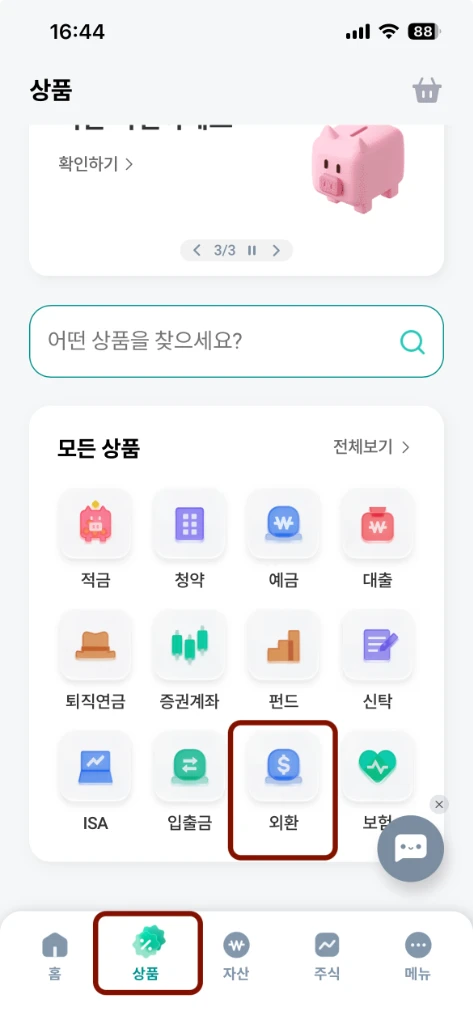
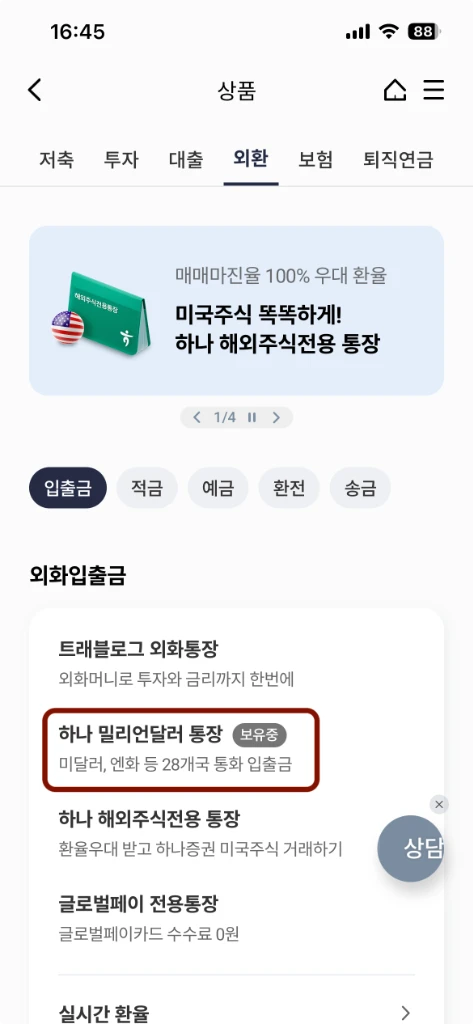
You can quickly open a foreign currency account by following these steps in the Hana 1Q app.
| 1. Select [Products] > [FX] | 2. Choose [Million Dollar] | 3. Check Info & Apply |
|---|---|---|
 |
 |
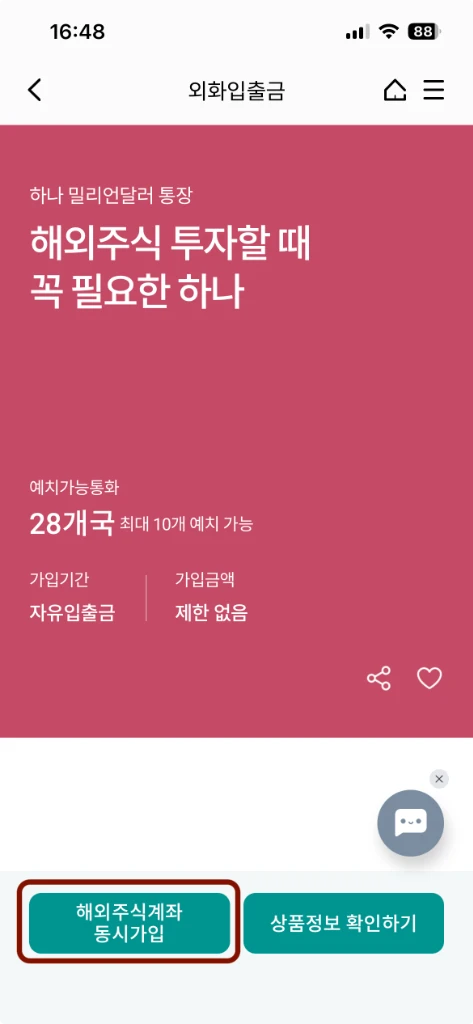 |
| Select the ‘FX’ tab under the ‘Products’ menu at the bottom. | Find ‘Million Dollar Account’ in the foreign currency list. | We recommend ‘Check Product Info’ before joint brokerage linkage. |
💡 Million Dollar Account Independent Opening Tip
During the application process, a pop-up may suggest linking a brokerage account. If you do not require a stock account, simply click ‘Cancel’ on the brokerage link screen to proceed with creating only the foreign currency bank account.
💡 Extra Tip: Verify Your English Name
If your English bankbook copy shows your name in Korean or if the English name differs from what you registered in AdSense after opening the account, you will need to set up your English name separately. Using the exact name shown there when registering for AdSense is the best way to ensure a smooth payout!
🎁 Essential for Fee Savings: YouTuber Auto-Deposit Service
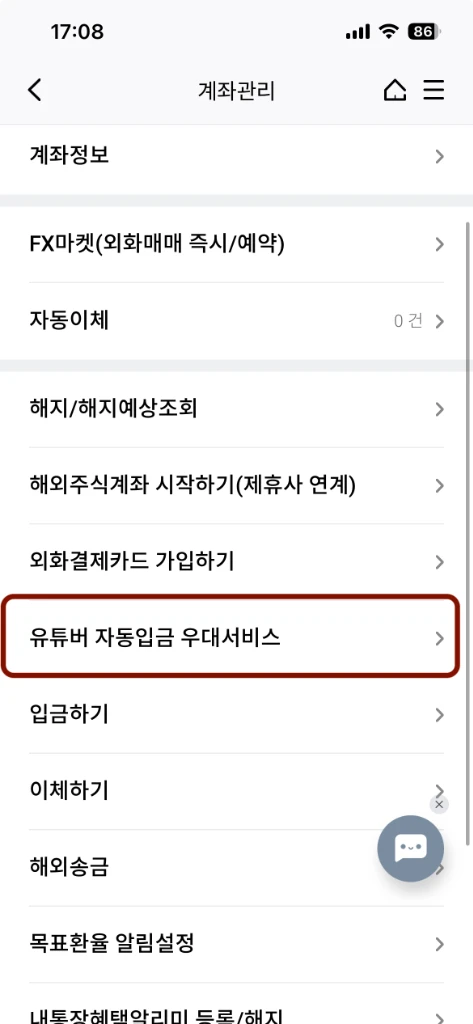
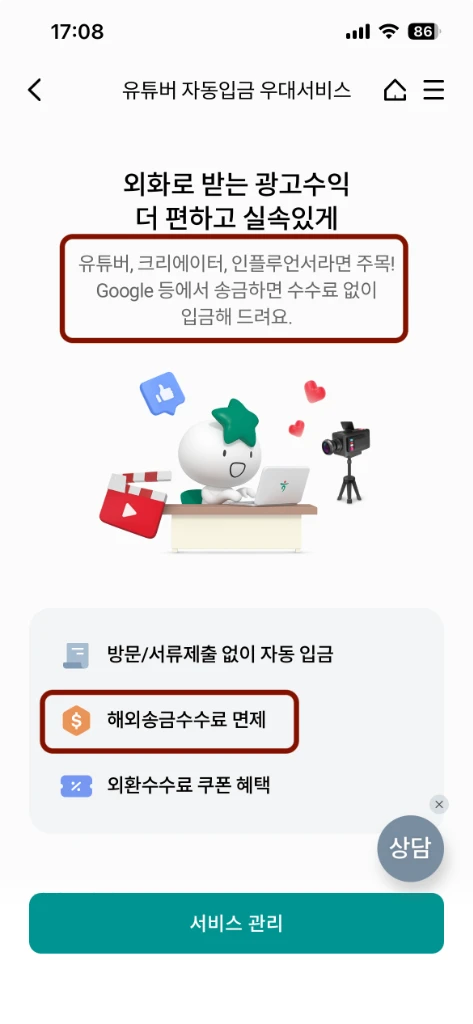
After opening your account, be sure to apply for the [Manage Account] > [YouTuber Auto-Deposit Preferential Service] in the Hana 1Q app. This service provides remittance fee waivers and favorable exchange rates for ad revenue sent from Google.
1. Select Manage Account 2. Apply for YouTuber Service Scroll down in the ‘Manage Account’ menu to find this option. Activating this service applies the remittance fee waiver.
Conclusion
We have explored the essential steps for opening a bank account and implementing fee-waiver strategies for AdSense revenue. By effectively utilizing the Hana Bank Million Dollar account and its YouTuber preferential service, you can manage your earnings more efficiently.
Now that your account is ready, please proceed to the next guide: Registering your payment method and submitting US/Singapore tax information to complete your setup.