![[AdSense #5] Fee-Free USD Transfer from Hana to Mirae Asset](/ko/hana-mirae-foreign-currency-transfer/cover_hu_fa8a60a99a8206ae.webp)
TL;DR
- Preparation: Register the Mirae Asset foreign-currency linked account in the Mirae Asset (M-STOCK) app first — otherwise it won’t show up as a deposit option in the Hana Bank OneQ app.
- No fee: Transfers from the Hana Million Dollar Account to the Mirae Asset linked FX account go through without an extra transfer fee.
- Path: Register in the Mirae Asset app, then in the Hana Bank OneQ app use Transfer to Hana Bank, set the withdrawal/deposit account, currency, and amount, and confirm.
Table of contents
Why Move Money from a Bank Account to a Securities FX Account?
Once AdSense earnings land in a Hana Million Dollar Account, a lot of people move that balance to Mirae Asset’s foreign-currency linked account — for trading stocks/ETFs, rebalancing around exchange rate swings, or just keeping FX in one place inside the securities app.
Transfers from the bank to the securities linked FX account are usually treated as within the same financial group, so no separate remittance fee applies. When I did it, sending USD from the Hana Million Dollar Account to Mirae Asset’s linked FX account went through with no extra fee. One thing has to happen first, though: registering the linked FX account.
Preparation: Register the Mirae Asset Linked FX Account
To pick “Mirae Asset foreign-currency linked account” as the deposit account in the Hana Bank OneQ app, that account first needs to be registered in the Mirae Asset (M-STOCK) app under the linked FX account agreement. By default it shows as “unregistered.”
Step 1: Find “Foreign currency linked account registration/cancellation”
Open the Mirae Asset (M-STOCK) app and search for “외화연계계좌등록/해지” (foreign currency linked account registration/cancellation) in the top search bar.
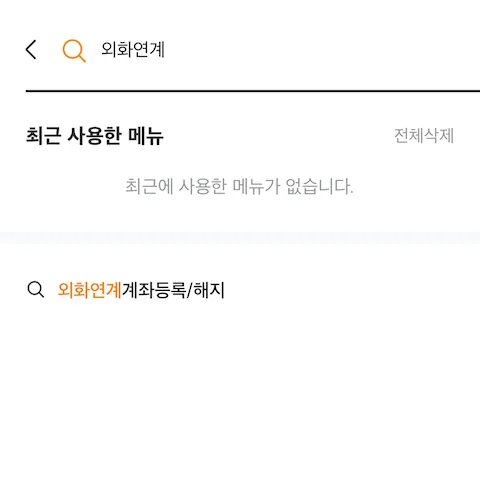 Searching “외화연계계좌등록/해지” in the Mirae Asset app opens the registration menu directly.
Step 2: Complete Registration
Select Hana Bank as the financial institution and register.
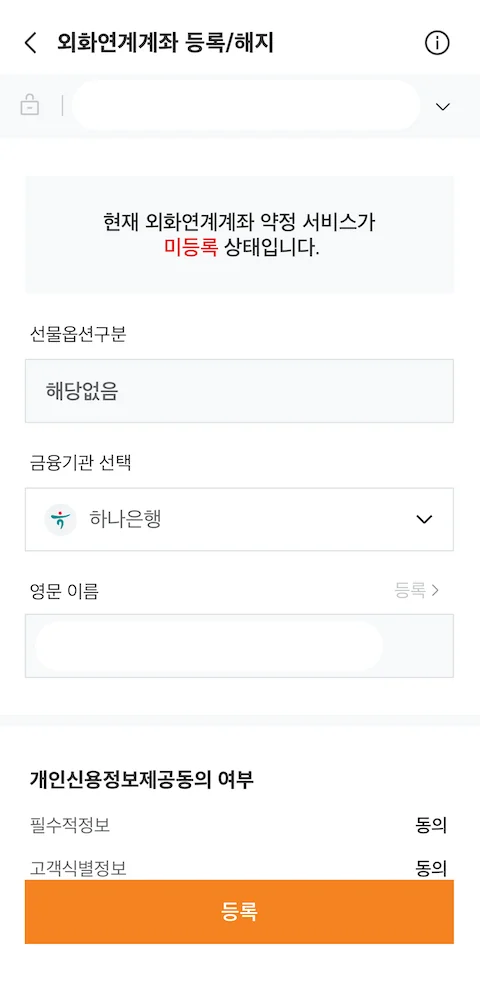 The screen shown when the linked FX account agreement is unregistered. Select Hana Bank, enter your English name, agree to the credit info consent, and tap [Register].
| Field | Value |
|---|---|
| Futures/options | Not applicable |
| Financial institution | Hana Bank |
| English name | Same as passport/bankbook, then tap [Register] |
| Credit info consent | Agree to required items |
Once registered, note the new linked FX account number, then open the Hana Bank OneQ app to send the transfer.
[!TIP] Transfer hours Transfers from Hana Bank to Mirae Asset’s linked FX account are available weekdays 09:00–23:50 (KST, business days only). Service may be limited on weekends and holidays.
Transfer to Hana Bank: Withdrawal → Deposit → Currency → Amount
Once the linked FX account is registered, the transfer itself happens in the Hana Bank OneQ app under “Transfer to Hana Bank.”
Entering the Withdrawal/Deposit Account, Currency, and Amount
- Withdrawal account: Select the Hana Million Dollar Account (or whichever Hana FX account you use)
- Deposit account: Select the Mirae Asset linked FX account
- Currency: Select USD
- Amount: Enter the USD amount and tap [Confirm]
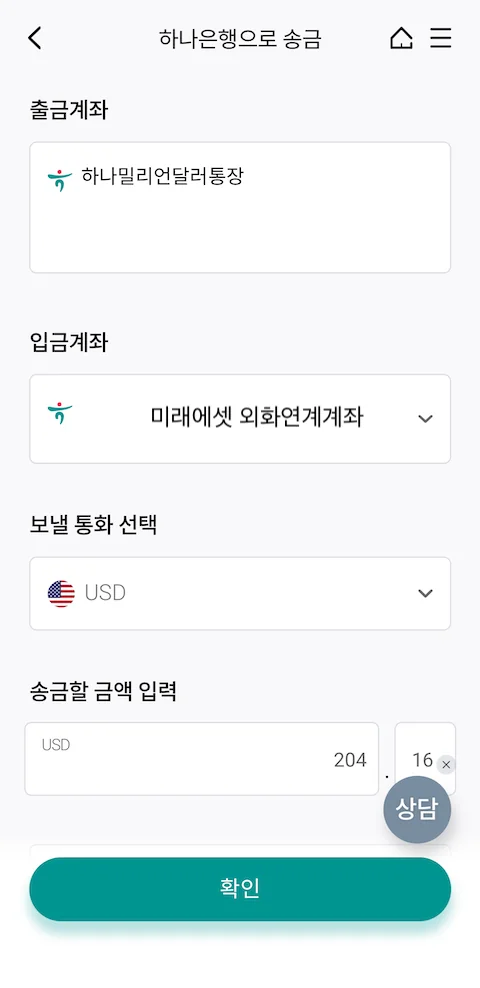 Set withdrawal account (Hana Million Dollar), deposit account (Mirae Asset FX), currency (USD), and amount; confirming completes the transfer with no fee.
Complete any final authentication as prompted, and the USD amount moves to the Mirae Asset linked FX account with no fee.
[!NOTE] Note Always double-check the exact fee (if any) on the transfer confirmation screen before finalizing.
To Sum Up
To move USD from a Hana Million Dollar Account to Mirae Asset’s linked FX account: ① register the linked FX account in the Mirae Asset (M-STOCK) app, then ② in the Hana Bank OneQ app, use “Transfer to Hana Bank” and enter the withdrawal/deposit account, currency, and amount. In my case, this path completed with no additional fee.
If you’re receiving AdSense revenue into a Million Dollar Account and plan to use it through a securities account, doing these two steps once means every future transfer only takes a few taps.
🔗 References
🔗 Full Series
- [AdSense #1] Hugo Blog AdSense Integration Guide
- [AdSense #2] Hana Bank Million Dollar Account & Fee Waiver Strategy
- [AdSense #3] Payment Method Registration & US/Singapore Tax Setup
- [AdSense #4] Reuniting with 10-Year-Old Earnings: The Final Payout Journey
- [AdSense #5] Transfer USD from Hana Million Dollar Account to Mirae Asset Securities, No Fee (this post)
- [AdSense #6] Finally Approved! Success on the Second Try