![[AdSense #2] Hana Million Dollar Account & Fee Waiver](/ko/hana-bank-adsense-account/cover_hu_81a20662e1386ebb.webp)
TL;DR
- Recommended account: Hana Bank Million Dollar Account (best fee waivers and FX rates).
- Fee waiver: Enable the ‘YouTuber Auto-Deposit Preferential Service’ for zero remittance fees.
- Payout threshold: Payouts start automatically once cumulative revenue hits $100.
Table of contents
Choosing the Right Account for AdSense
After AdSense approval, receiving payouts requires a foreign currency account. Remittance fees vary a lot between banks, and registering the wrong one can eat a real chunk of your earnings in fees.
After comparing a few banks, I settled on the Hana Bank Million Dollar Account. Here’s how I opened it and set up the fee waiver.
🚀 Series Preview
This is the second post in the [AdSense Series].
- [Previous] [AdSense #1] Hugo Blog AdSense Integration Guide
- [Current] Hana Bank Million Dollar Account & Fee Waiver Strategy
- [Next] [AdSense #3] Payment Method Registration & US/Singapore Tax Setup
With the bank picked, here’s the actual account opening and fee-waiver setup.
Opening and Configuring a Hana Bank ‘Million Dollar Account’
Hana Bank is recommended for AdSense payouts because of its remittance fee waivers and favorable exchange rates for content creators. Cutting unnecessary fees is the first step in optimizing your payout.
📱 Hana 1Q App Menu & Application Path
Follow these steps in the Hana 1Q app to open a foreign currency account.
| 1. Select [Products] > [FX] | 2. Choose [Million Dollar] | 3. Check Info & Apply |
|---|---|---|
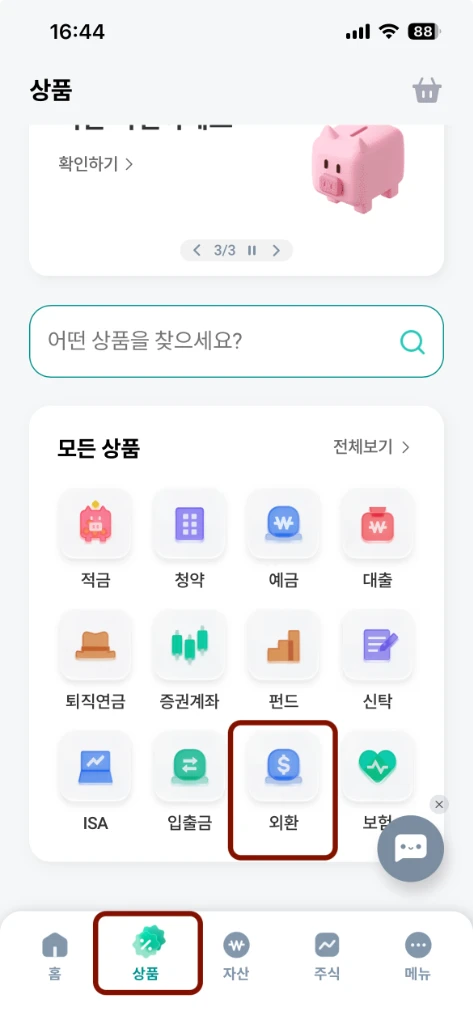 | 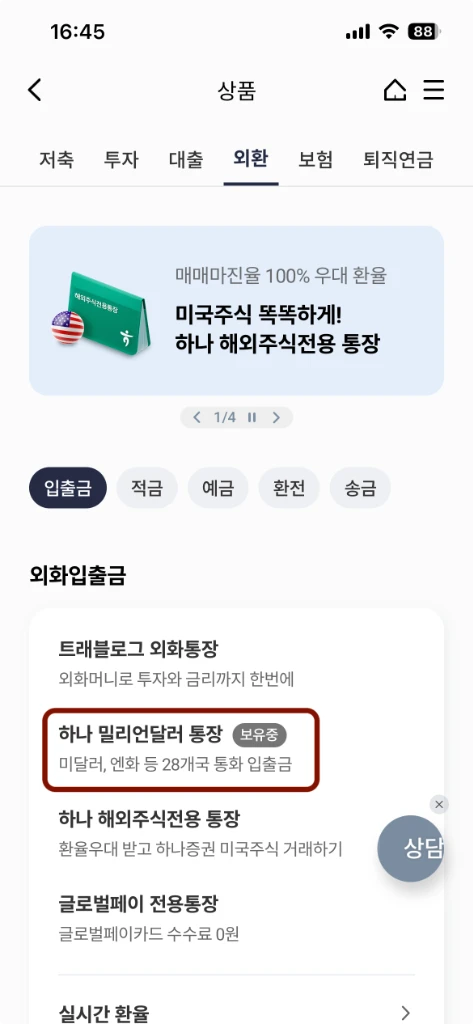 | 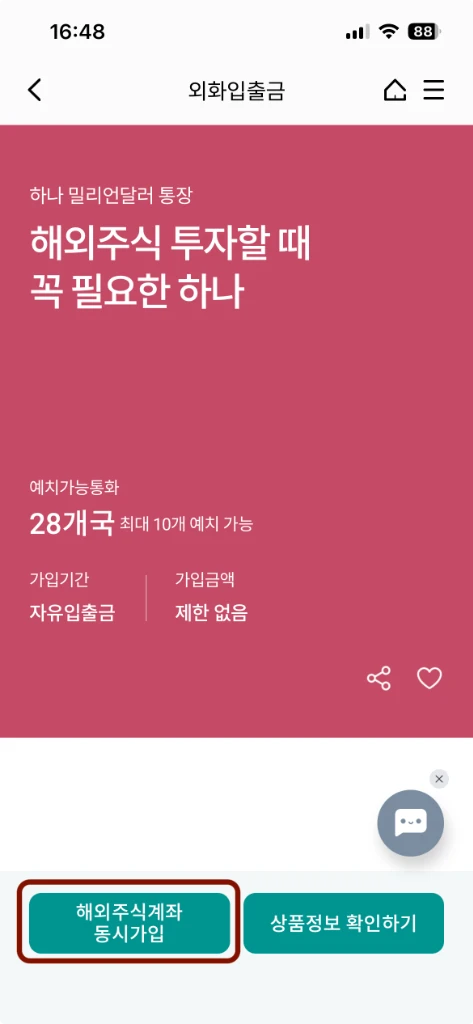 |
| Select the ‘FX’ tab under the ‘Products’ menu at the bottom. | Find ‘Million Dollar Account’ in the foreign currency list. | Check the product info first rather than the brokerage bundle. |
💡 Opening the Account on Its Own
During the application, a pop-up may suggest linking a brokerage account. If you don’t need one, just tap ‘Cancel’ at that step to open only the foreign currency account.
💡 Verify Your English Name
If your English bankbook shows your name in Korean, or the English name differs from what’s registered in AdSense, you’ll need to set your English name separately. Using the exact same name when registering for AdSense is the safest bet.
🎁 Essential for Fee Savings: YouTuber Auto-Deposit Service
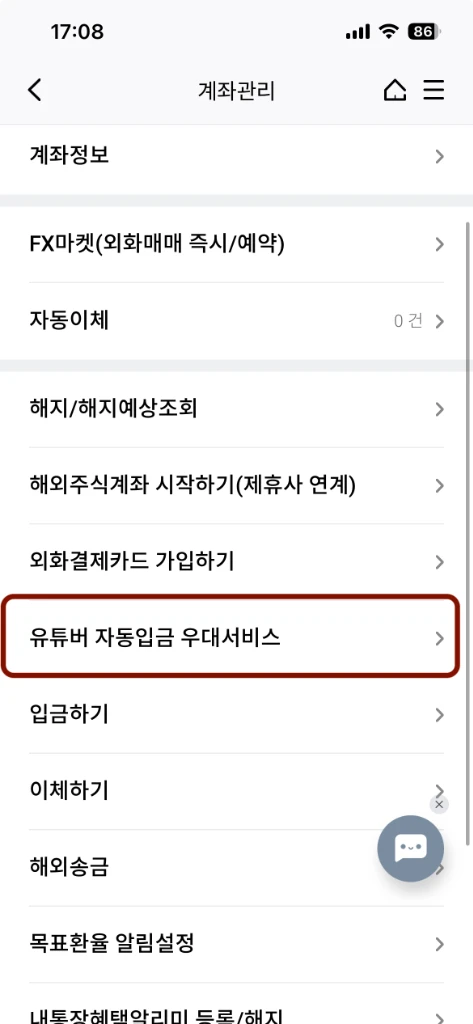
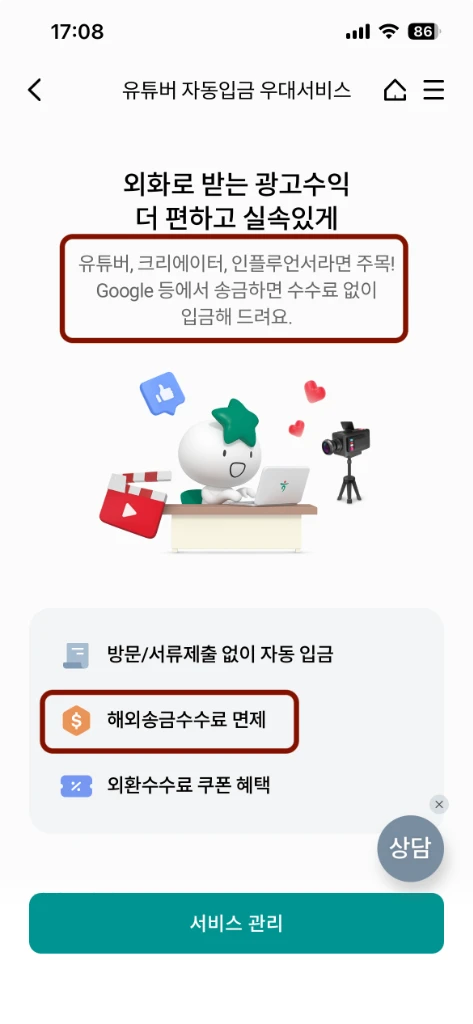
After opening the account, apply for the [Manage Account] > [YouTuber Auto-Deposit Preferential Service] in the Hana 1Q app. This waives remittance fees and gives better exchange rates on ad revenue sent from Google.
1. Select Manage Account 2. Apply for YouTuber Service Scroll down in ‘Manage Account’ to find this option. Activating this applies the remittance fee waiver.
Once the Account Is Ready
That covers opening the account and setting up the fee waiver. Using the Hana Bank Million Dollar Account with the YouTuber preferential service makes managing the earnings noticeably easier.
Next: registering your payment method and submitting US/Singapore tax information.
🔗 References
🔗 Full Series
- [AdSense #1] Hugo Blog AdSense Integration Guide
- [AdSense #2] Hana Bank Million Dollar Account & Fee Waiver Strategy (this post)
- [AdSense #3] Payment Method Registration & US/Singapore Tax Setup
- [AdSense #4] Reuniting with 10-Year-Old Earnings: The Final Payout Journey
- [AdSense #5] Transfer USD from Hana Million Dollar Account to Mirae Asset Securities, No Fee
- [AdSense #6] Finally Approved! Success on the Second Try