![[AdSense #4] Claiming 10-Year-Old Earnings: The Payout](/ko/adsense-payout-experience-and-fees/cover_hu_b3794c87150eff2c.webp)
TL;DR
- Earnings longevity: Revenue from a decade ago pays out fine once payment method and tax info are set up correctly.
- Timeline: It took 7 days from opening the bank account (Jan 17) to receiving the remittance advice (Jan 23).
- Fee preference: A mismatch in the sender’s name kept the fee waiver from applying automatically.
Table of contents
Bridging a 10-Year Gap
My AdSense history goes back a full decade, to a tech blog I ran back then. That small balance barely cleared the payout threshold ($100) and sat dormant in the account ever since. Restarting this blog gave me a reason to finally get it deposited.
I knew it had crossed $100, but I didn’t realize it had passed $200. So seeing the actual balance — $215.97 — felt pretty good.
Prices have gone up a lot over ten years, but my earnings stayed frozen in time like something out of cryostasis. At least the exchange rate climbed in the meantime, which was some consolation.
Bottom line: old earnings are safe and payable. But I ran into a ‘fee’ obstacle along the way, which I’m documenting here.
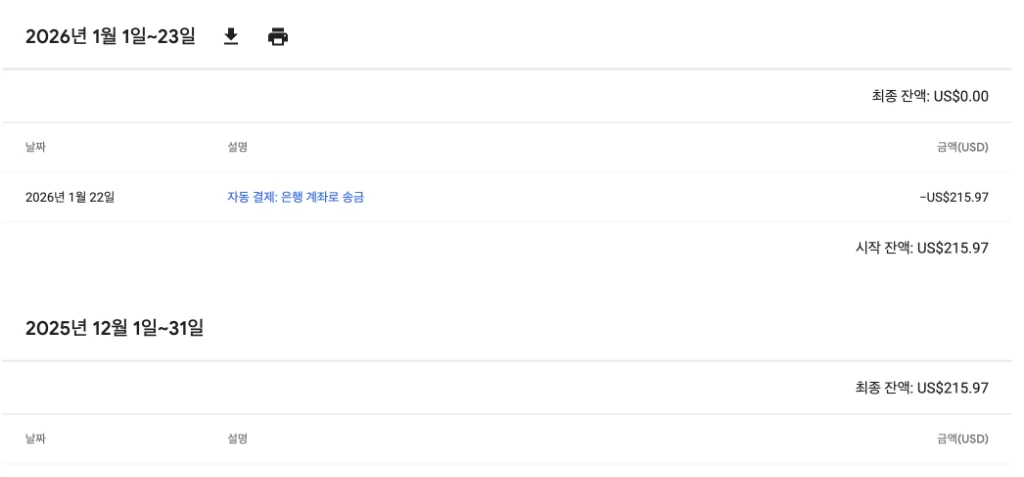 The moment $215.97, dormant for 10 years, was finally paid out, bringing the balance to $0.00
The 7-Day Payout Timeline
Here’s the chronology from bank setup to receiving the funds.
| Date | Milestone | Details |
|---|---|---|
| Jan 17 | Account Opening | Opened a Hana Bank ‘Million Dollar Account’ via mobile app and joined the YouTuber Auto-Deposit service. |
| Jan 21 | Tax Configuration | Submitted US Tax Info (W-8BEN) and applied for Hometax Residency Certificate. |
| Jan 22 | Full Approval | Residency Certificate issued; Singapore Tax info submitted and all approved. |
| Jan 22 | Payment Notice | Received “Google AdSense: Check your recent payment” email. |
| Jan 23 | Remittance Advice | Received ADVICE OF REMITTANCE email from Hana Bank. |
[!TIP] The email isn’t the final step. Even after the
ADVICE OF REMITTANCEemail from Hana Bank, the funds aren’t in the account yet. Under FX regulations, you have to manually confirm receipt and select a reason before the deposit actually goes through.
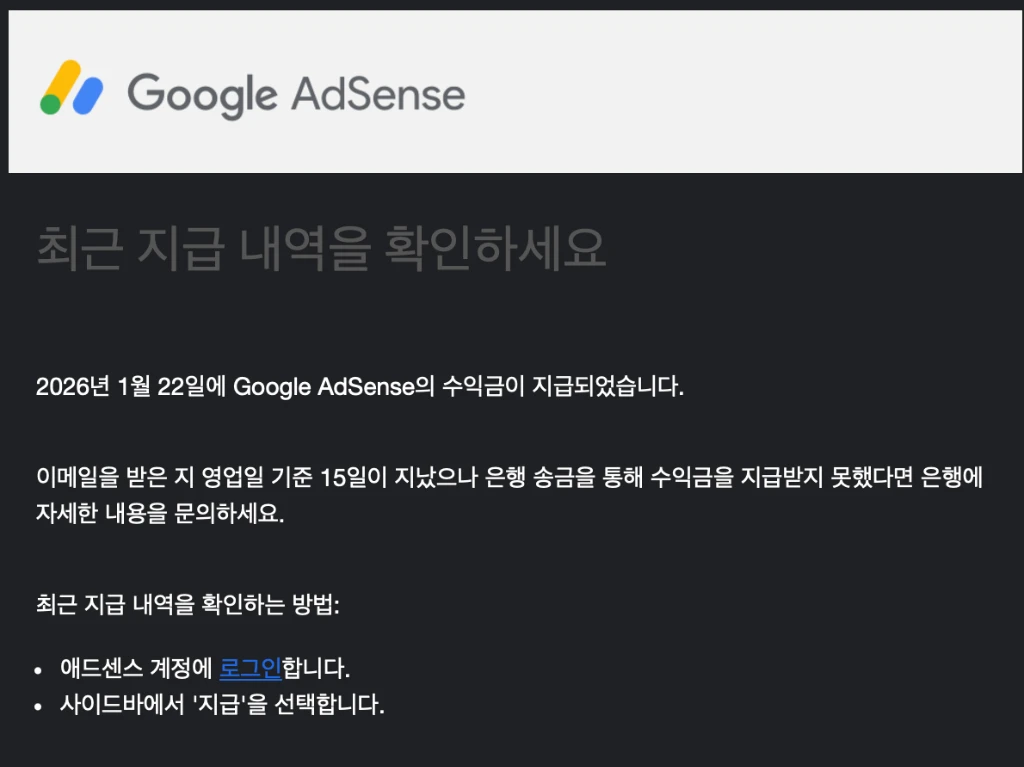 The official email from Google AdSense notifying that a payout was dispatched.
Email Notification from Hana Bank (ADVICE OF REMITTANCE)
A few days after Google dispatches the payout, Hana Bank sends an ADVICE OF REMITTANCE email confirming the funds arrived at the local bank.
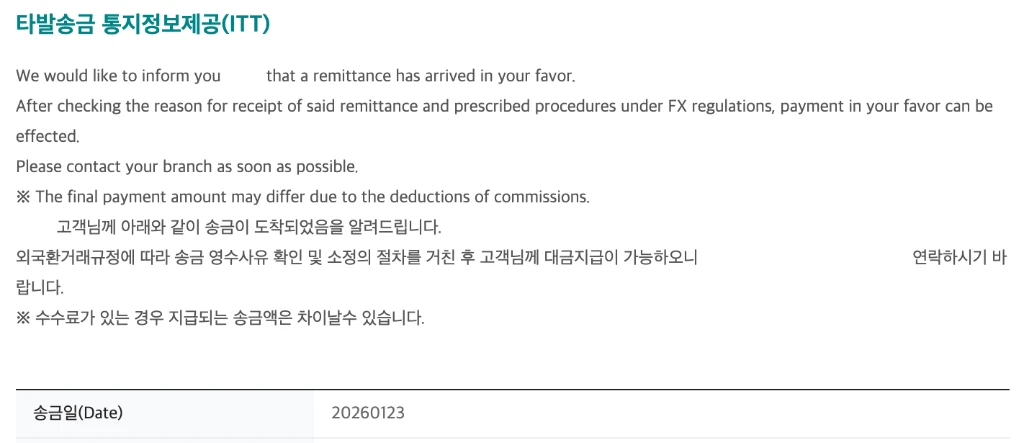 The incoming telegraphic transfer (ITT) notification from Hana Bank.
The email confirmed the money had arrived, but the actual deposit details in the app told a slightly different story.
⚠️ Payout Analysis: Fee Issues & The Final Twist
The amount that landed was less than expected. I only noticed because the fee had been deducted from the account, and I only understood exactly why after calling Hana Bank’s support line. Two issues turned up.
Intermediary Bank Fee ($5)
Of the original $215.97 sent by Google, a $5 intermediary bank fee was deducted in transit, leaving $210.97 by the time it reached Hana Bank. This is a standard fee charged during international transfers, separate from the local bank’s own charges.
A Receipt Fee of ~$10 ($6.81)
The most surprising part: I didn’t get the YouTuber (AdSense) Auto-Deposit fee waiver I’d set up in the previous post, so a separate receipt fee applied. Checking the [Receive Incoming Remittance] menu in the Hana 1Q app showed a $6.81 deduction (about 10,000 KRW) as the receipt fee, leaving $204.16 as the final amount.
| Stage | Amount | Notes |
|---|---|---|
| Original Remittance | $215.97 | Amount shown on AdSense dashboard |
| Intermediary Fee | -$5.00 | Deducted before reaching Hana Bank |
| Receipt Fee (Hana) | -$6.81 | ~10,000 KRW (waiver didn’t apply) |
| Final Net Amount | $204.16 | Actual amount credited |
[!TIP] Fee-saving tip: raise your payout threshold International remittance fees are charged per transaction. If your monthly earnings barely clear $100, paying a fee every month adds up. Raising the AdSense payout threshold from $100 to something higher (say $500 or $1,000) cuts down how often you pay it.
In total, of the original $215.97, about $11.81 (roughly 20,000 KRW) went to fees, leaving $204.16 in hand.
Why Did Google Send the Transfer as ‘LIMITED’ Instead of ‘LTD’?
Spot the difference between these two names:
GOOGLE ASIA PACIFIC PTE LTD(registered in the banking system)GOOGLE ASIA PACIFIC PTE LIMITED(sender name on the actual transfer)
LTD and LIMITED mean the exact same thing, but the banking system treated them as two different senders.
Same meaning, different spelling — and that was enough to keep the YouTuber (AdSense) Auto-Deposit waiver from applying automatically. If anyone knows why Google uses the full name here, I’d genuinely like to know.
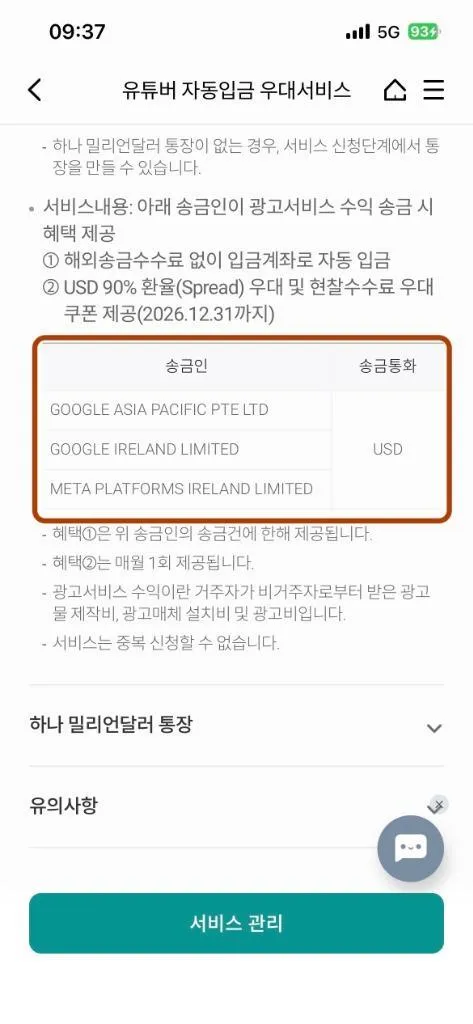 The list of eligible senders for the preferential service. A minor name difference decides whether the fee gets waived.
[!NOTE] 📞 Hana Bank System Update According to the support rep I spoke with, starting January 27, 2026, the system will be updated so that transfers from
GOOGLE ASIA PACIFIC PTE LIMITEDare also recognized for the YouTuber Auto-Deposit waiver. Payouts from February onward shouldn’t run into the same fee issue.
📱 Manual Receipt Process: Direct Action in Hana 1Q
Even with the auto-deposit service applied for, a manual receipt step is usually still required to confirm the reason for the remittance under FX regulations — separate from whether the fee waiver applies. Here’s the path in the Hana 1Q app:
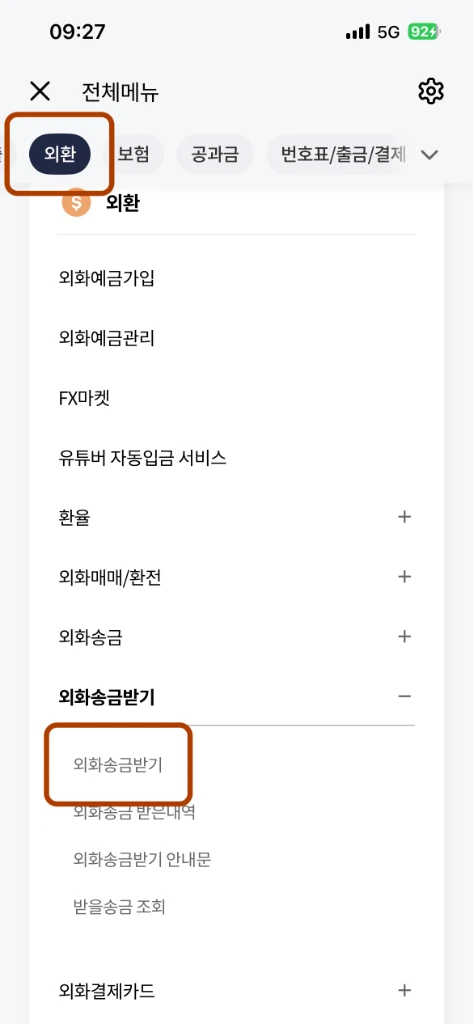 Navigate through the [FX] menu to [Receive Incoming Remittance] for manual processing.
- Open the Hana 1Q app and tap [All Menu] at the bottom.
- Navigate to [FX] > [Receive Incoming Remittance] > [Receive Incoming Remittance].
- Verify the incoming remittance and tap [Deposit].
- Select reason for receipt:
- Category:
Resident's Business Income(most accurate for tax purposes) orOther Income / Gift - Detail:
Ad Revenue(Transaction Code: 940300)
- Category:
- Confirm the final details to finalize the deposit.
[!TIP] Choosing a reason: AdSense revenue is classified as ‘Business Income’ from ‘Ad Revenue (940300)’. For consistency with Korean tax reporting (Global Income Tax),
Resident's Business Income>Ad Revenueis the recommended choice. If the annual amount is very small, some useOther Incomefor simplicity.
Once confirmed manually, the funds show up in the foreign currency account immediately.
A 10-Year Wait, Finally Closed Out
The ‘monetization’ I vaguely dreamed about ten years ago finally became real. Even though the money had been sitting dormant for a decade, watching each step of the actual deposit process play out was worth documenting. The fee waiver didn’t apply automatically, but bringing dollars into the country during a high exchange-rate period, and getting paid directly from Google in foreign currency, was still a good experience.
🔗 Full Series
- [AdSense #1] Hugo Blog AdSense Integration Guide
- [AdSense #2] Hana Bank Million Dollar Account & Fee Waiver Strategy
- [AdSense #3] Payment Method Registration & US/Singapore Tax Setup
- [AdSense #4] Reuniting with 10-Year-Old Earnings: The Final Payout Journey (this post)
- [AdSense #5] Transfer USD from Hana Million Dollar Account to Mirae Asset Securities, No Fee
- [AdSense #6] Finally Approved! Success on the Second Try