![[AdSense #3] Payment Method & US/Singapore Tax Setup](/ko/adsense-tax-setup/cover_hu_3c2a0011a4b418e5.webp)
TL;DR
- Identity verification (PIN): Complete address verification with the PIN mailer sent once your balance hits $10.
- Payment integration: Register your foreign currency account (SWIFT code, etc.) for automated payouts.
- Tax optimization: Submit US (W-8BEN) and Singapore tax info to lower withholding and avoid double taxation.
Table of contents
Configuring the System for AdSense Payouts
With the foreign currency account ready, the next phase is configuring the payout system itself. Linking the payment method and filling in tax information correctly automates the payout and prevents unnecessary tax withholding.
This post covers the AdSense payment registration process and the somewhat fiddly US and Singapore tax submission.
🚀 Series Preview
This is the third post in the [AdSense Series].
- [Previous] [AdSense #1] Hugo Blog AdSense Integration Guide
- [Previous] [AdSense #2] Hana Bank Million Dollar Account & Fee Waiver Strategy
- [Current] AdSense PIN Verification & Tax Information Setup
- [Next] [AdSense #4] Reuniting with 10-Year-Old Earnings: The Final Payout Journey
Reaching $10: Residence Verification via PIN
Once your balance crosses $10, the first gate is identity verification. Google mails a physical PIN to confirm the address you registered is real.
- Trigger: Google automatically dispatches the PIN once your balance reaches $10.
- Delivery: As international mail, expect 2 to 8 weeks.
- Payout threshold: Actual deposits only start once cumulative revenue exceeds $100.
[!TIP] Check your address: If the PIN hasn’t arrived after 3 weeks, double-check your address in AdSense settings — a missing apartment/unit number is a common culprit.
Once the PIN is on its way, the next step is registering the bank account that will actually receive the money.
Registering AdSense Payment Method (Detailed Input)
Once your account is open, it’s time to register it on the AdSense dashboard. Even a small typo can delay payment, so use the table below.
| AdSense Field | Input (Hana Bank Million Dollar Account) | Note |
|---|---|---|
| Account Holder Name | HONG GILDONG | Use the English name exactly as it appears on your English bankbook copy. |
| Bank Name | KEB Hana Bank | The official English name of Hana Bank. |
| SWIFT BIC | KOEXKRSE | Hana Bank’s unique identifier code. |
| Account Number | 1234567890XXX | Numbers only, no hyphens (-). |
| Repeat Account Number | 1234567890XXX | Re-enter the same number. |
🏛️ Major Korean Bank Info (SWIFT Codes)
If you’re using a different bank, use this table.
| Bank Name | English Name | SWIFT Code |
|---|---|---|
| KB Kookmin | Kookmin Bank | CZNBKRSE |
| Shinhan | Shinhan Bank | SHBKKRSE |
| Woori | Woori Bank | HVBKKRSE |
| Hana | KEB Hana Bank | KOEXKRSE |
| SC Korea | Standard Chartered Bank | SCBLKRSE |
| IBK | Industrial Bank of Korea | IBKOKRSE |
| NH Nonghyup | Nonghyup Bank | NACFKRSE |
[!WARNING] Bank information can change. Double-check the official English bank name and SWIFT code on your bank’s site or bankbook copy before submitting.
[!CAUTION] For most individual residents in Korea, you can leave the Intermediary Bank and FFC/FBO fields blank. No need to overthink it.
With the account registered, one crucial step remains: tax information, to stop revenue leaking out as withholding.
Entering Tax Information (US & Singapore Tax Setup)
With the bank account linked, tax info needs to be accurate to avoid excessive withholding on payouts. Submitting tax info for both the US and Singapore is now required.
A. US Tax Information (W-8BEN)
Required to get tax benefits on ad revenue generated from US viewers.
- Account Type: Select ‘Individual’.
- US Citizen Status: Select ‘No’.
- W-8 Tax Form Type: Select W-8BEN (for non-US individuals).
- W-8BEN Form: Click ‘Go to W-8BEN Form’.
- Taxpayer Identification Number (TIN):
- Foreign TIN: Required to claim tax treaty benefits.
- Individuals: Enter your 13-digit Resident Registration Number (RRN) without hyphens (
-). - Businesses: Enter your 10-digit Business Registration Number (BRN) without hyphens (
-).
- Individuals: Enter your 13-digit Resident Registration Number (RRN) without hyphens (
- Foreign TIN: Required to claim tax treaty benefits.
- Tax Treaty: Select ‘Yes’ to claim benefits under the US-Korea tax treaty.
- Services (AdSense): Select 0% withholding rate.
- Movies & TV (YouTube/Partner): Select 10% withholding rate.
- Other Copyright (Play Store, etc.): Select 10% withholding rate.
- Document Delivery Method: Select ‘Go paperless (Recommended)’.
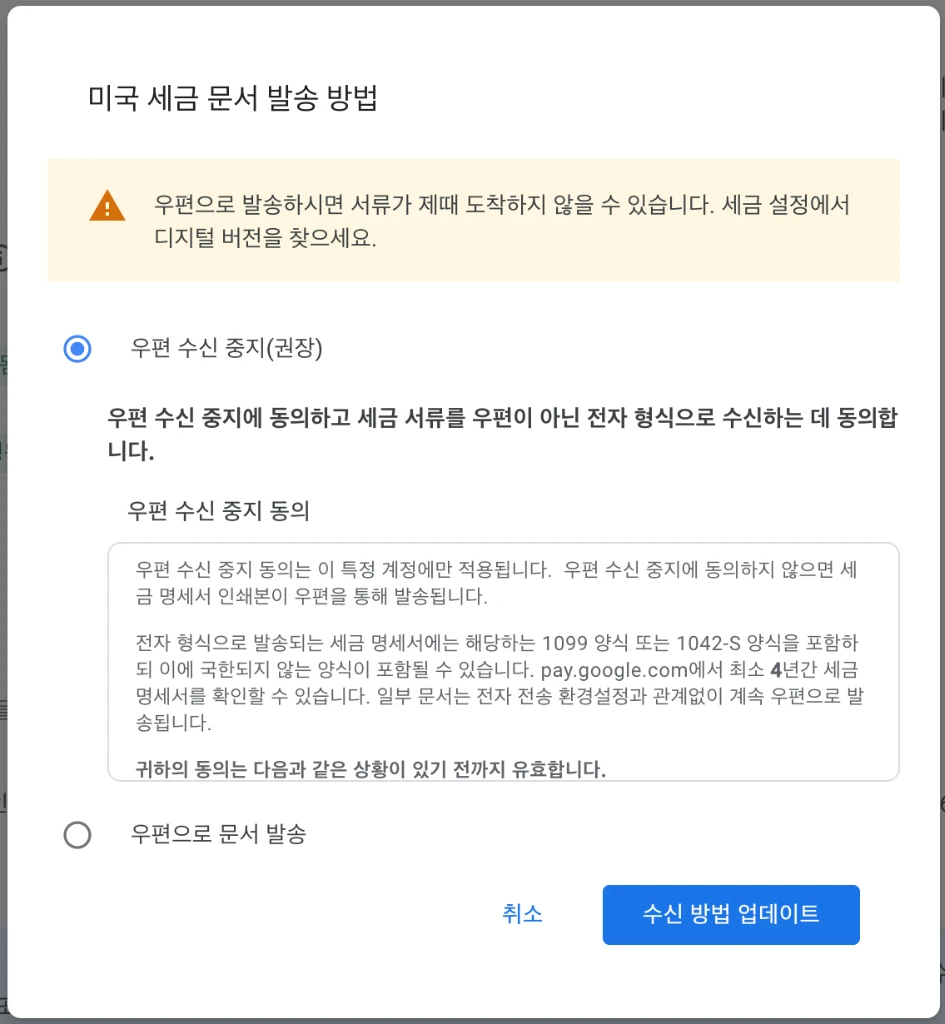 Digital delivery avoids the loss/delay risk of international mail and is more secure.
[!TIP] Why go paperless: International mail from the US takes a long time and gets lost fairly often. Digital delivery gives instant access to statements and is safer for sensitive information.
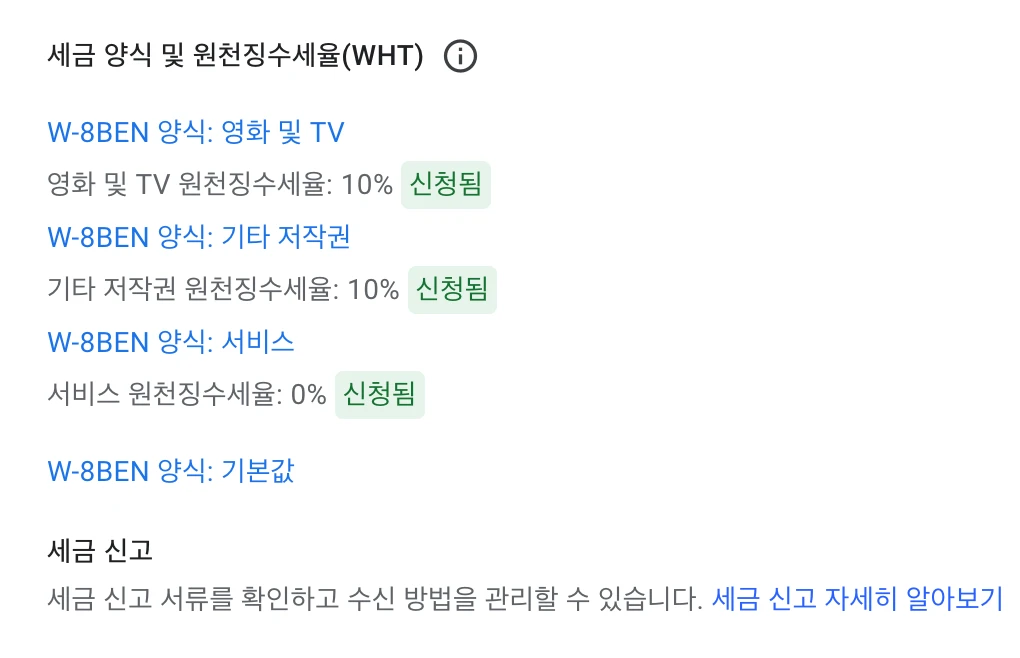 Claiming tax treaty benefits per category via the W-8BEN form
B. Singapore Tax Information
Needed to optimize the withholding rate on Singapore-based revenue. The Tax Residency Certificate is the key document.
- Business Information: Select ‘Individual/Sole Proprietorship’.
- Fixed Establishment in Singapore: Select ‘No’.
- Applying for Exemption: Select ‘Yes’. (Important)
- Tax Residency Proof: Select ‘Tax Residency Certificate’ and upload the PDF from Hometax.
📄 How to Apply on NTS Hometax (Step-by-Step)
- Log in to Hometax.
- Navigate:
Request/Report Tax Certificates>Other Civil Petitions>Apply for Tax Residency Certificate. - Fill in details:
- Purpose:
Tax Exemption based on Tax Treaty. - Name/Address (English): Must exactly match your AdSense profile.
- Destination Country:
SG (SINGAPORE). - Year: Current year.
- Purpose:
- Submit & save: Once the tax office approves it, download the certificate as a PDF from
Check Results of Civil Petitionsand upload it to AdSense.
[!TIP] Avoid rejection: Even a tiny discrepancy in the address can get it rejected. Copy the info directly from the AdSense Payment Center instead of retyping it.
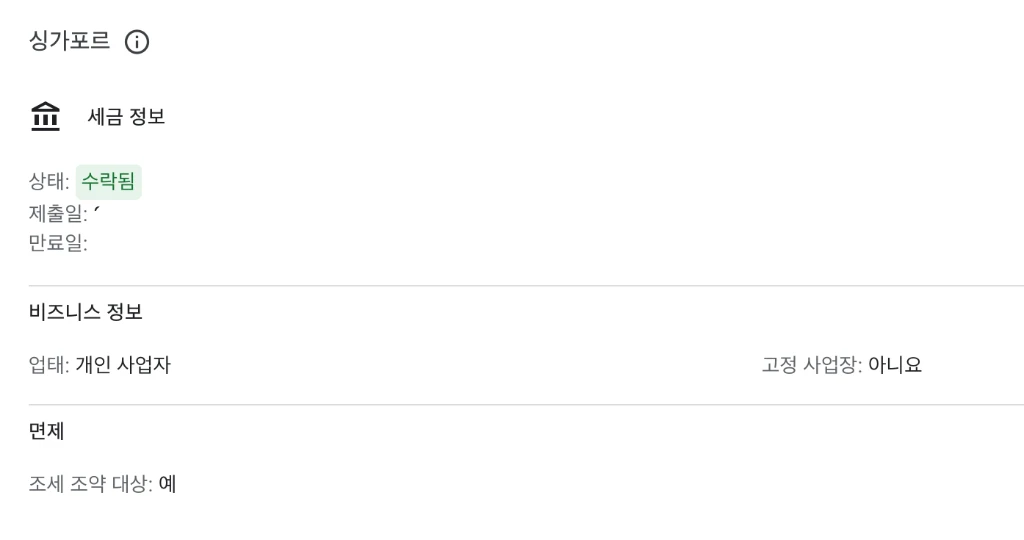 Final ‘Accepted’ status after uploading the certificate
Final Step: Verifying All Tax Statuses
Once both US and Singapore info are submitted, everything on the ‘Manage Tax Info’ page should read ‘Approved’ or ‘Accepted’.
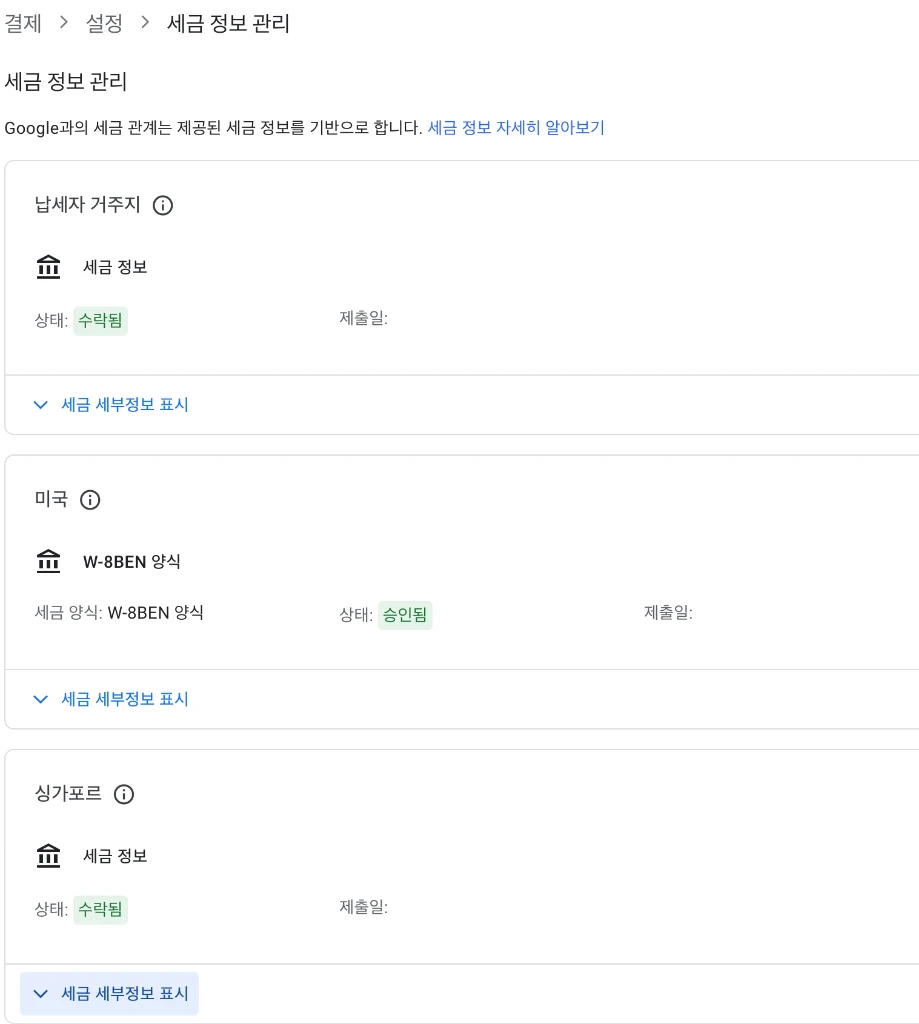 Taxpayer residence, US (W-8BEN), and Singapore all processed correctly
Once This Is Done
That covers payment method registration through US and Singapore tax setup — the full technical prep for receiving AdSense revenue. Getting it right is what keeps revenue from leaking out and keeps the payout process smooth.
Don’t stress if the PIN mail is late. As long as the address is correct, it arrives eventually. Mine took 5 weeks.
🔗 References
🔗 Full Series
- [AdSense #1] Hugo Blog AdSense Integration Guide
- [AdSense #2] Hana Bank Million Dollar Account & Fee Waiver Strategy
- [AdSense #3] Payment Method Registration & US/Singapore Tax Setup (this post)
- [AdSense #4] Reuniting with 10-Year-Old Earnings: The Final Payout Journey
- [AdSense #5] Transfer USD from Hana Million Dollar Account to Mirae Asset Securities, No Fee
- [AdSense #6] Finally Approved! Success on the Second Try