![Featured image of post [AdSense #3] Payment Method Registration & US/Singapore Tax Setup](/ko/adsense-tax-setup/cover_hu_3c2a0011a4b418e5.webp)
Direct Answer & TL;DR
- Identity Verification (PIN): Complete address verification using the PIN mailer sent once you reach a $10 balance.
- Payment Integration: Register your foreign currency bank info (SWIFT code, etc.) for automated payouts.
- Tax Optimization: Submit US (W-8BEN) and Singapore tax info to lower withholding rates and prevent double taxation.
Configuring Your System for AdSense Payouts
After finalizing your foreign currency account, the next phase is configuring your payout system. Properly linking your payment method and providing accurate tax information is essential for automating your earnings and minimizing unnecessary tax withholding.
In this guide, I will walk you through the AdSense payment registration process and provide step-by-step instructions for submitting US and Singapore tax information.
🚀 Series Preview
This is the third post in the [AdSense Series].
- [Previous] [AdSense #1] Hugo Blog AdSense Integration Guide
- [Previous] [AdSense #2] Hana Bank Million Dollar Account & Fee Waiver Strategy
- [Current] AdSense PIN Verification & Tax Information Setup
- [Next] [AdSense #4] My First Payout After 10 Years & The “Fee Trap”
Reaching $10: Residence Verification via PIN
Once your balance hits $10, the first essential step is ‘Identity Verification.’ Google sends a physical mail containing a PIN code to confirm that your registered address is authentic.
- Trigger: Google automatically dispatches the PIN once your balance reaches $10.
- Delivery: As international mail, expect a delivery window of 2 to 8 weeks.
- Payout Milestone: Cumulative revenue must exceed $100 for funds to be transferred to your account.
[!TIP] Check Your Address: If your PIN doesn’t arrive after 3 weeks, double-check your address in AdSense settings. Make sure your apartment number or building name is included correctly!
Once you have initiated the PIN verification process, the next step is to register the bank account where you will receive your actual earnings.
Registering AdSense Payment Method (Detailed Input)
Once you’ve opened your account, it’s time to register it on the AdSense dashboard. Even a small typo can delay your payment, so refer to the table below for accurate entry.
| AdSense Field | Input (Based on Hana Bank Million Dollar) | Tip |
|---|---|---|
| Account Holder Name | HONG GILDONG |
Use your English name exactly as it appears on your English bankbook copy. |
| Bank Name | KEB Hana Bank |
The official English name of Hana Bank. |
| SWIFT BIC | KOEXKRSE |
The unique identification code for Hana Bank. |
| Account Number | 1234567890XXX |
Enter numbers only, without hyphens (-). |
| Repeat Account Number | 1234567890XXX |
Re-enter the same account number for verification. |
🏛️ Major Korean Bank Info (SWIFT Codes)
If you are using a different bank, please refer to the table below.
| Bank Name | English Name | SWIFT Code |
|---|---|---|
| KB Kookmin | Kookmin Bank | CZNBKRSE |
| Shinhan | Shinhan Bank | SHBKKRSE |
| Woori | Woori Bank | HVBKKRSE |
| Hana | KEB Hana Bank | KOEXKRSE |
| SC Korea | Standard Chartered Bank | SCBLKRSE |
| IBK | Industrial Bank of Korea | IBKOKRSE |
| NH Nonghyup | Nonghyup Bank | NACFKRSE |
[!WARNING] Bank information may change over time. Please double-check the official English bank name and SWIFT code through your bank’s website or an English bankbook copy.
[!CAUTION] In most cases for individual residents in Korea, you can leave the Intermediary Bank and FFC/FBO fields blank. Keep it simple!
With your account registered, the final and most crucial step remains: configuring your tax information to prevent any unnecessary revenue leakage.
Entering Tax Information (US & Singapore Tax Setup)
Now that you’ve linked your bank account, you must provide your tax information accurately to prevent excessive tax withholding on your payouts. Submitting tax information for both the US and Singapore is now mandatory.
A. US Tax Information (W-8BEN)
This is an essential process to receive tax benefits for ad revenue generated from US viewers.
- Account Type: Select ‘Individual’.
- US Citizen Status: Select ‘No’.
- W-8 Tax Form Type: Select W-8BEN (for non-US individuals).
- W-8BEN Form: Click ‘Go to W-8BEN Form’.
- Taxpayer Identification Number (TIN):
- Foreign TIN: Mandatory for claiming tax treaty benefits.
- Individuals: Enter your 13-digit Resident Registration Number (RRN) without hyphens (
-). - Businesses: Enter your 10-digit Business Registration Number (BRN) without hyphens (
-).
- Individuals: Enter your 13-digit Resident Registration Number (RRN) without hyphens (
- Foreign TIN: Mandatory for claiming tax treaty benefits.
- Tax Treaty: Select ‘Yes’ to claim benefits under the US-Korea tax treaty.
- Services (AdSense): Select 0% withholding rate.
- Movies & TV (YouTube/Partner): Select 10% withholding rate.
- Other Copyright (Play Store, etc.): Select 10% withholding rate.
- Document Delivery Method: Select ‘Go paperless (Recommended)’.
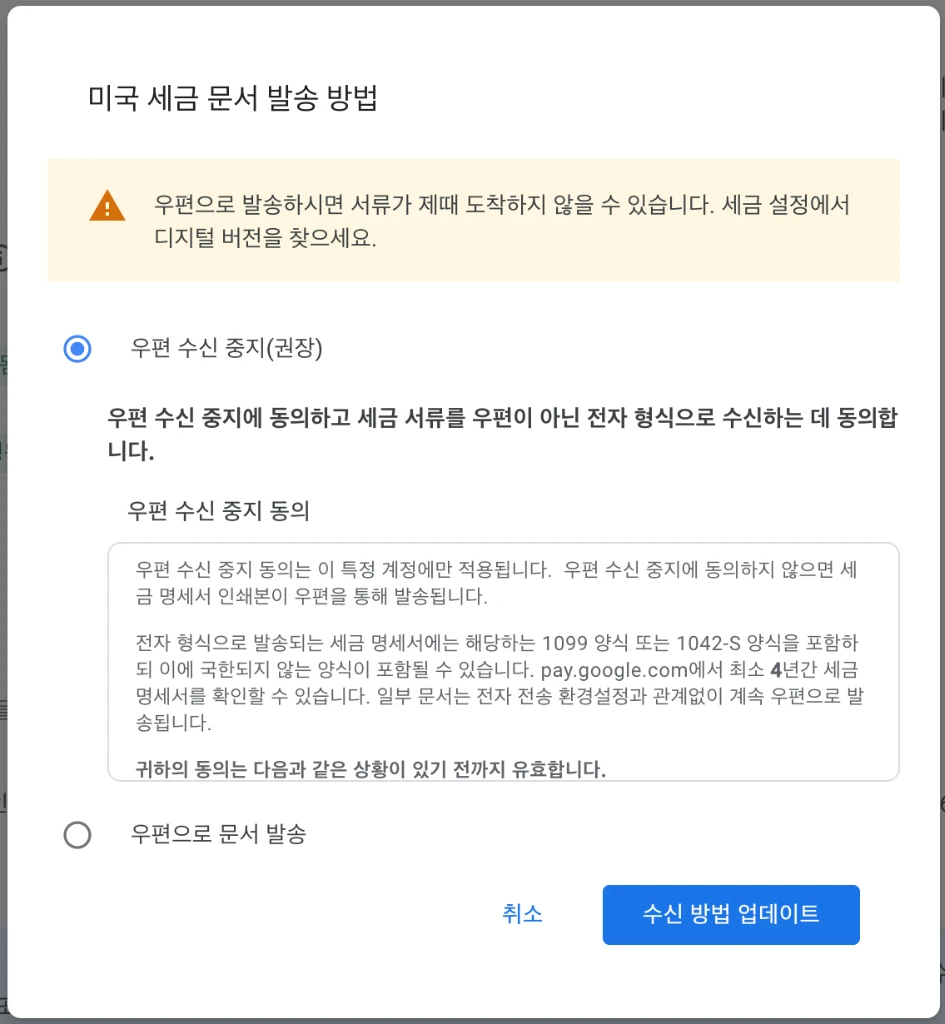 Prioritize digital delivery to ensure document security and immediate accessibility, mitigating the common risks of international mail loss or delay.
[!TIP] Why choose ‘Go paperless’? International mail from the US can take a significant amount of time and is prone to loss. Choosing digital delivery allows for instant access to your statements and provides better security for your sensitive information.
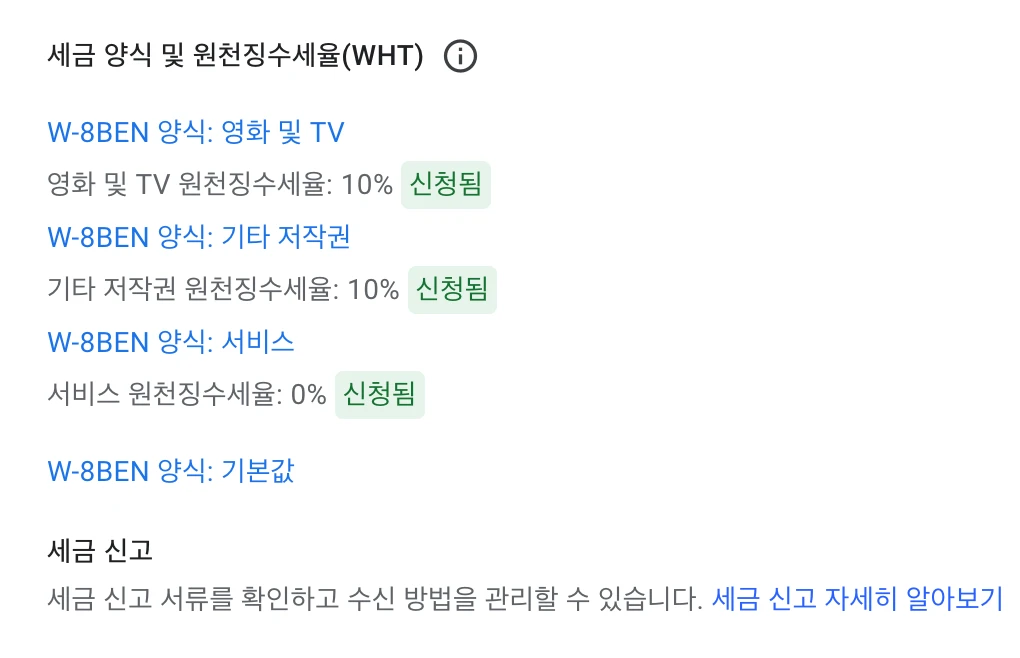 Applying for tax treaty benefits for each category via W-8BEN form
B. Singapore Tax Information
Necessary for optimizing withholding tax rates on Singapore-based revenue. The Tax Residency Certificate is the key.
- Business Information: Select ‘Individual/Sole Proprietorship’.
- Fixed Establishment in Singapore: Select ‘No’.
- Appying for Exemption: Select ‘Yes’. (Crucial!)
- Tax Residency Proof: Select ‘Tax Residency Certificate’ and upload the PDF file obtained from Hometax.
📄 How to Apply on NTS Hometax (Step-by-Step)
- Login to Hometax: Using your certificate.
- Navigate:
Request/Report Tax Certificates>Other Civil Petitions>Apply for Tax Residency Certificate. - Fill in Details:
- Purpose:
Tax Exemption based on Tax Treaty. - Name/Address (English): Must exactly match your AdSense profile.
- Destination Country:
SG (SINGAPORE). - Year: Enter the current year.
- Purpose:
- Submit & Save: Once approved by the tax office, you can download the certificate as a PDF from the
Check Results of Civil Petitionsmenu. Upload this PDF to AdSense.
[!TIP] Avoid Rejection: Even a tiny discrepancy in the address can lead to rejection. Copy and paste your info directly from the AdSense Payment Center!
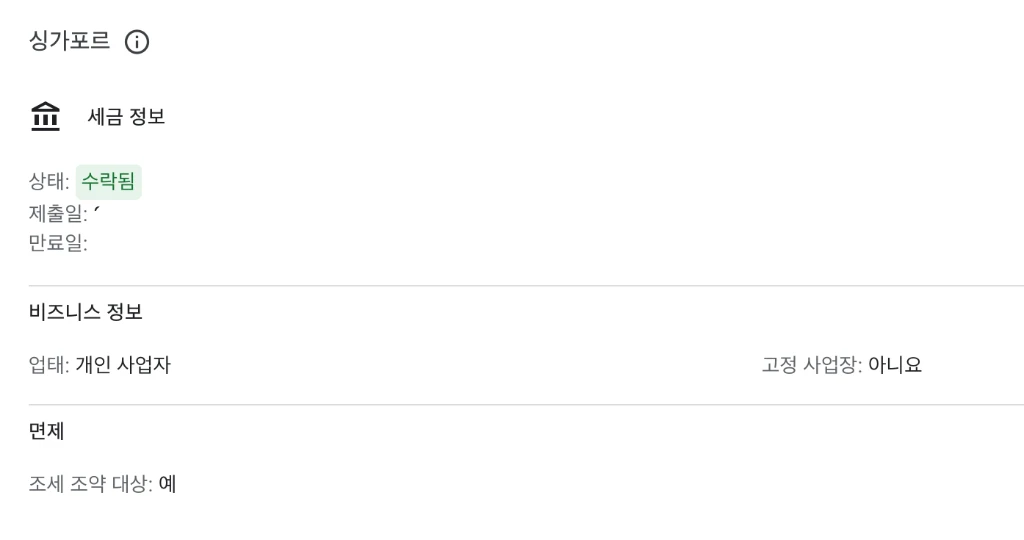 Final ‘Accepted’ status after uploading the certificate
Final Step: Verifying All Tax Statuses
Once you’ve submitted both US and Singapore information, all items on the ‘Manage Tax Info’ page should appear as ‘Approved’ or ‘Accepted’ as shown below.
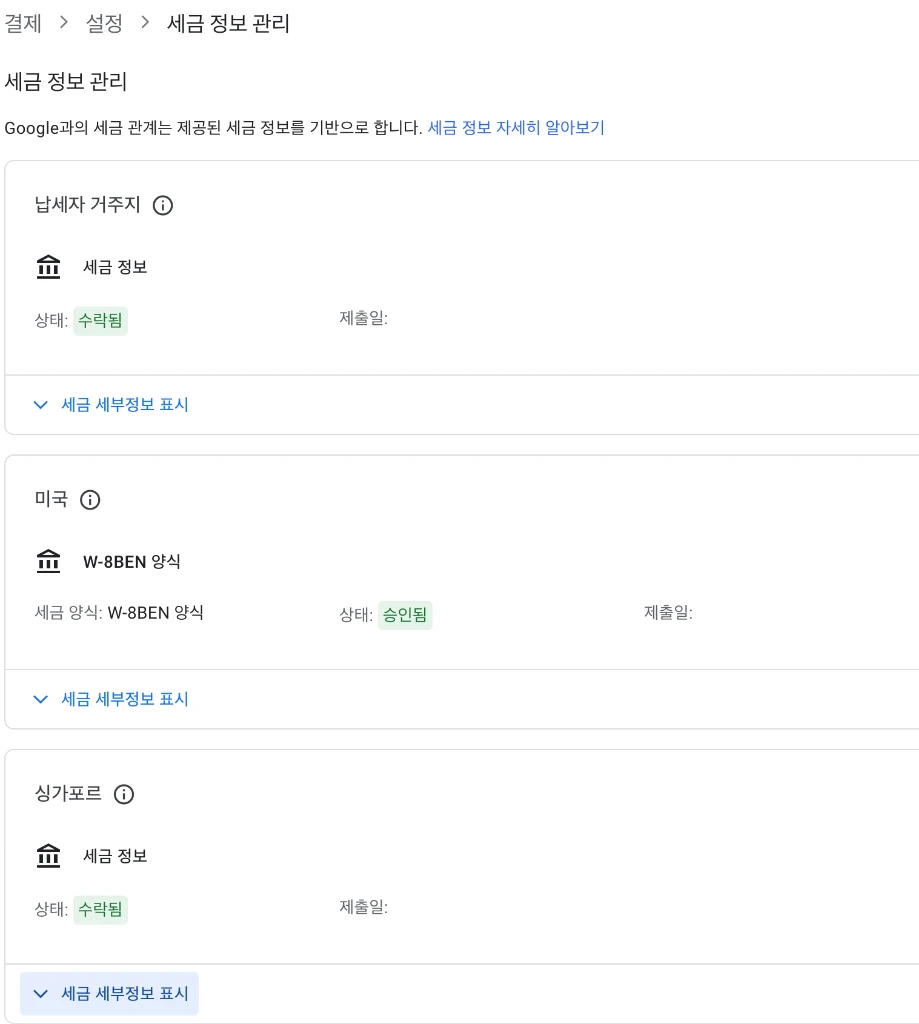 Success! Taxpayer Residence, US (W-8BEN), and Singapore sections are all processed correctly.
Conclusion
Starting from payment method registration to US and Singapore tax configuration, we have completed all technical preparations for receiving AdSense revenue. Accurate configuration is a key step in preventing revenue leakage and ensuring a smooth settlement process.
With these settings finalized, you can now focus on growing your blog through consistent content production. We wish you great success in your blogging journey.
Editor’s Note: Don’t stress if the PIN mail is late. As long as your address is correct, it will arrive. (Mine took 5 weeks! 😅)