
 Finding the cheapest airfare with Google Flights
TL;DR (Quick Summary)
- Use Google Flights’ “flexible dates” feature to compare prices across multiple days at a glance.
- The price graph and date grid make it easy to find the cheapest travel dates.
- Set up price tracking to get alerts when prices drop.
Introduction: Why Use Google Flights?
When planning a trip, one of the biggest concerns is always flight prices. Well, my bank account’s health is the real issue, but that’s another story.
Especially for those with flexible schedules, you probably know that “when you fly” can make a huge difference in price. The same destination can cost $100+ more or less just by shifting your departure by a single day.
That’s why I always check Google Flights first. Sure, there’s Skyscanner, Kayak, and others, but Google Flights has some unique power features. (Especially for those with flexible dates!)
Google Flights: Key Features and Benefits
Google Flights is a free flight search service provided by Google. It searches hundreds of airlines and OTAs (Online Travel Agencies) in real-time, letting you compare prices at a glance.
Key Benefits
| Feature | Description |
|---|---|
| Free | No additional fees or commissions |
| Real-time Prices | Compare live prices from airlines and OTAs |
| Date Flexibility | Find lowest prices across flexible dates |
| Price Tracking | Get alerts for price changes on saved routes |
| Explore Feature | Discover worldwide destinations when undecided |
💡 Google Flights is a search service, not a booking agent. Actual bookings are made through airline or travel agency websites.
Understanding the core architecture of Google Flights allows for a more strategic approach to fare comparison. Let’s delve into the specific techniques for identifying the lowest possible fares.
Core Techniques: Power Features for Flexible Travelers
Using the Date Grid Feature
After entering your origin and destination on Google Flights, click on “Date Grid” in the date selection area.
This feature shows lowest prices for each departure/return date combination in a table format.
For example, when searching for Seoul → Tokyo round trip:
- Horizontal axis: Departure dates
- Vertical axis: Return dates
- Each cell: Lowest price for that combination
The cheapest combinations are highlighted in green, making it easy to spot the best deals at a glance.
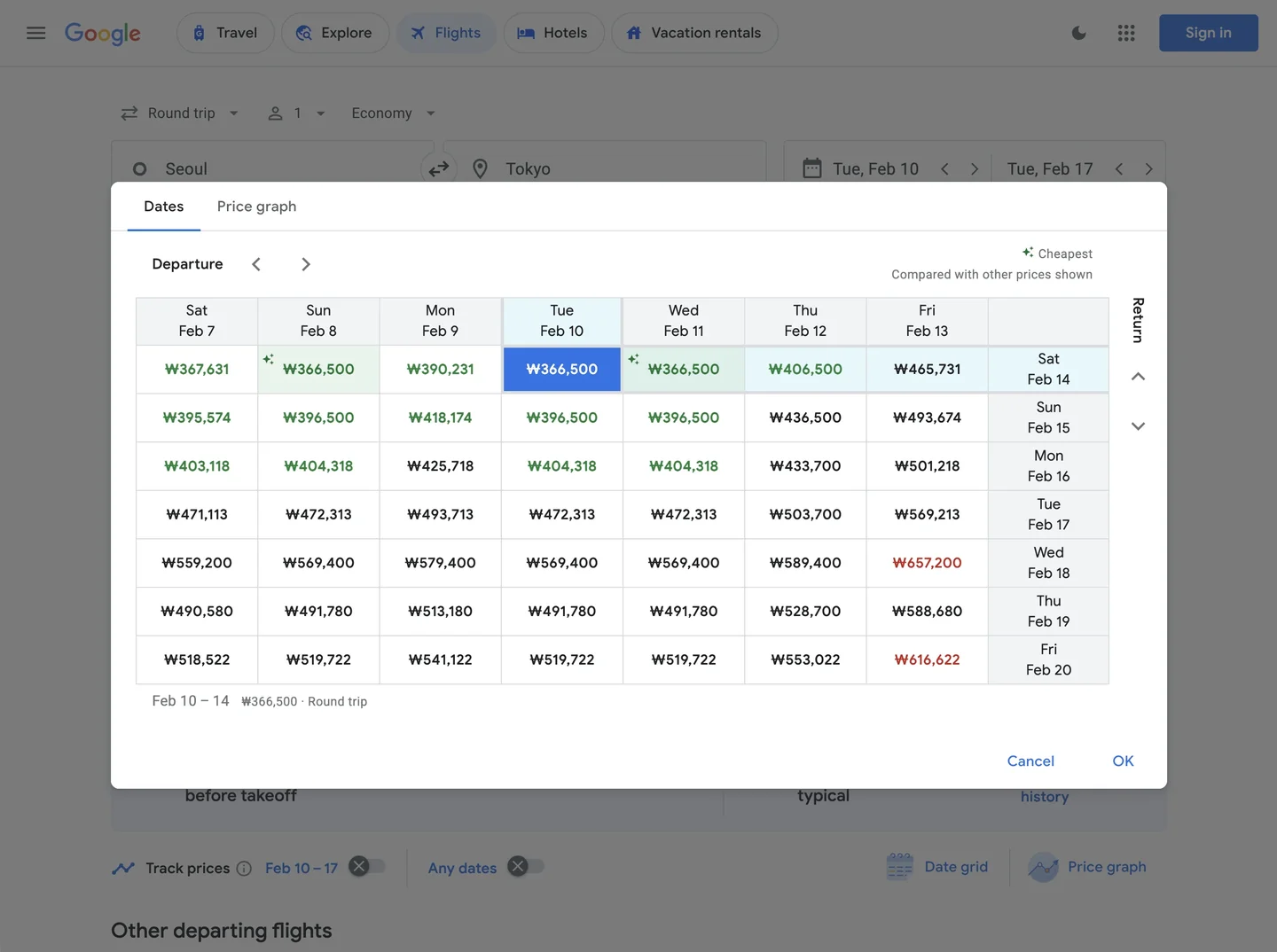 Quickly identifying cheapest date combinations with the Date Grid
Price Graph for Monthly Trends
Click the “Price Graph” tab in the date selection screen to see monthly price fluctuations for your route.
Why this feature is incredibly useful:
- Visually compare off-season and peak season prices
- Identify the cheapest weeks within a specific month
- Predict price spikes during holidays and festivals
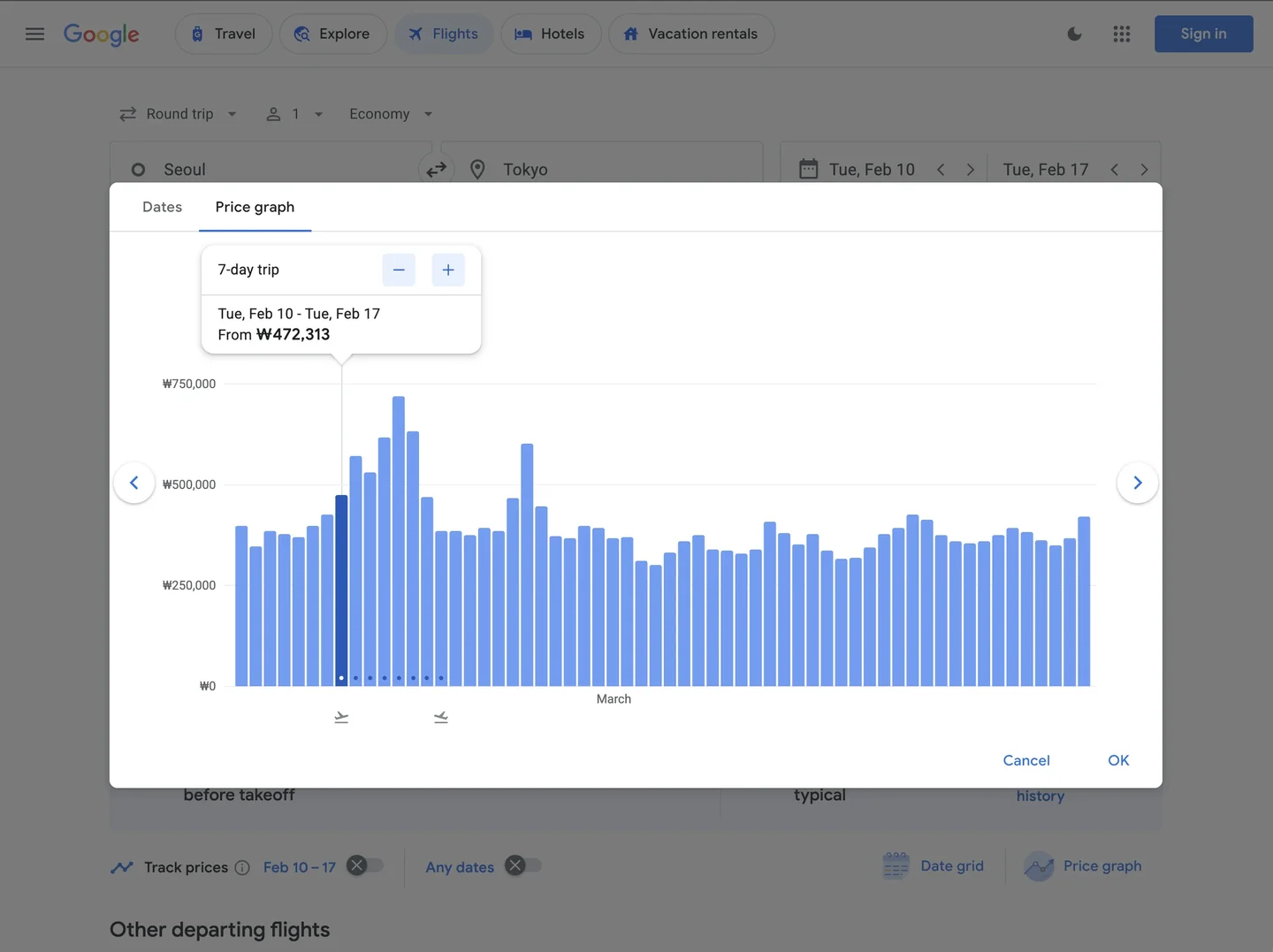 Visualizing monthly price trends with the Price Graph
⚠️ Pro Tip: International flights are often cheapest 6 weeks to 2 months before departure. Of course, this varies by route and season!
Explore Feature: Find Worldwide Deals
The ultimate feature for those who “haven’t decided on a destination yet”!
Click the “Explore” button on the Google Flights main page, and you’ll see a map with lowest prices to destinations worldwide.
How to use it:
- Enter only your departure city (e.g., New York)
- Set approximate travel dates
- Browse cheapest destinations on the map
- Click on interesting cities for detailed searches
Even after identifying the optimal window, continuous surveillance is necessary to capitalize on real-time volatility.
Monitoring: Automated Alerts via Price Tracking
Prices fluctuate in real-time. A $500 ticket today might be $450 tomorrow—or it could jump to $550.
With Google Flights’ Price Tracking feature:
- Search your desired route
- Turn ON the “Track prices” toggle
- Receive email alerts when prices change
How to Set Up Price Tracking
The core of this feature is email notifications. Google will automatically send you an email when the price of your desired flight drops.
- Search your desired route (e.g., Seoul → Okinawa)
- Enable the “Track prices” switch located at the bottom left of the search results
- You must be logged into your Google account. (Tracking is automatically saved to your account)
- Receive immediate email alerts whenever prices rise or fall!
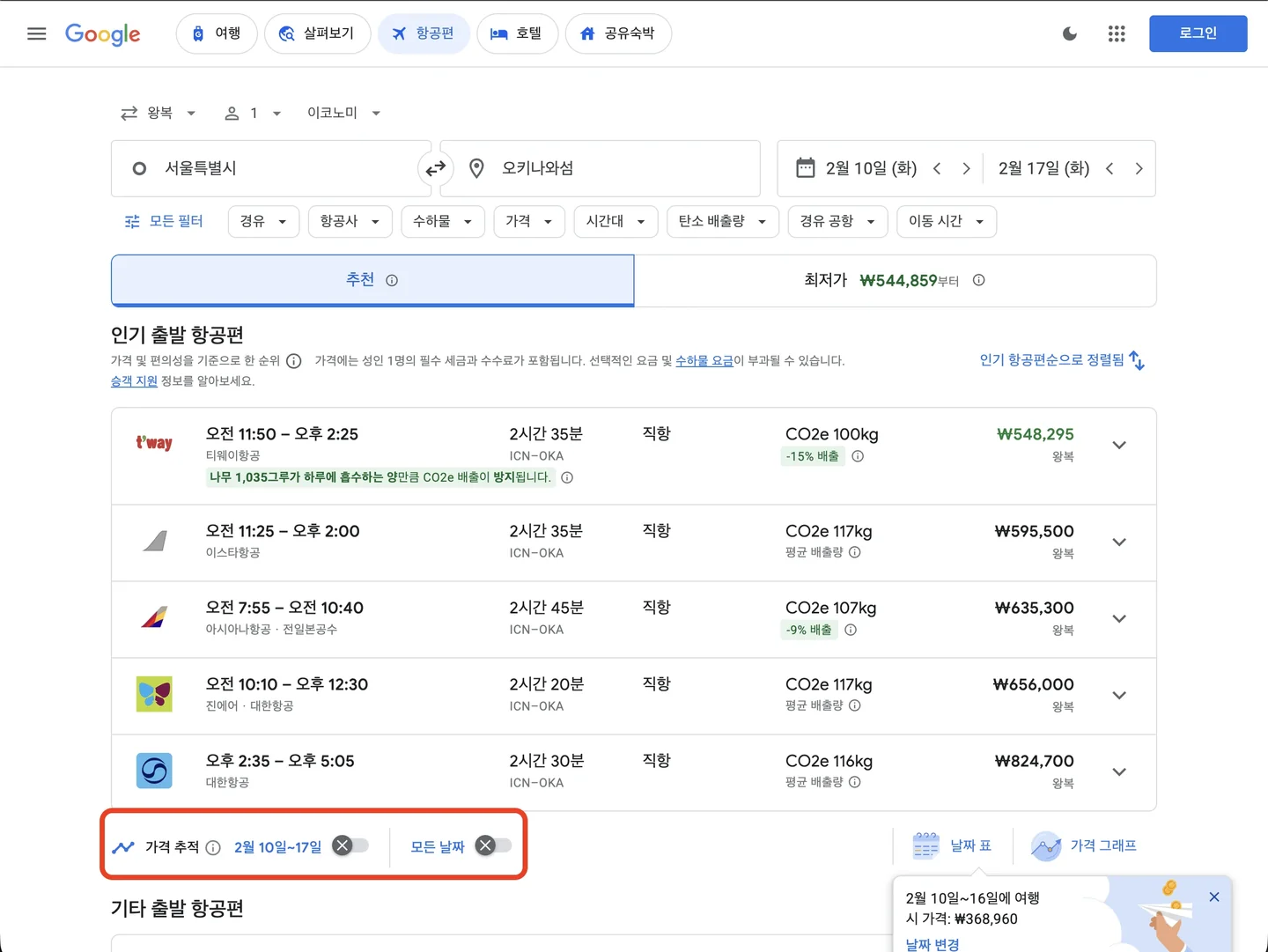 Enabling the Price Tracking feature to receive email alerts
📌 When Google determines that “now is the lowest price” level, it’ll specifically notify you. When you get this alert, book immediately!
Case Study & Final Thoughts: Elevating the Planning Experience
Real Example: Finding Cheap Flights from NYC to Tokyo
Let me share how I actually used Google Flights when planning a recent Tokyo trip.
Conditions
- Origin: New York (JFK/EWR/LGA)
- Destination: Tokyo (NRT/HND)
- Trip Duration: 7 nights
- Schedule Flexibility: Anytime in March-April
Search Process
- Date Grid Check: Mid-March weekday departures were cheapest
- Price Graph Check: Third week of March was consistently affordable
- Final Result:
The weekday advantage is real!Found round-trip for $650 departing March 18 (Tue) → returning March 25 (Tue)!
The same period with weekend departures (Sat-Sat) was $850+. That’s a $200 difference!
Summary: Strategic Search Preserves Your Budget
Google Flights goes beyond being a simple flight search tool—it’s a service that makes trip planning itself enjoyable.
For those with flexible schedules, remember these key features:
- Date Grid: Find the cheapest date combinations
- Price Graph: Understand seasonal pricing trends
- Explore Feature: Discover hidden destination gems
- Price Tracking: Book at the perfect moment
Master these four features, and you can significantly reduce your travel budget.
However, there’s a key takeaway: instead of obsessing over the absolute lowest price, it’s often better to book at a reasonable price within your desired timeframe. Furthermore, if the price difference is minimal, booking directly on the airline’s official website is advantageous. It makes handling cancellations or changes much smoother than going through an agency.
💰 The cheapest flights aren’t about “when you buy” but “how you search.”
Ready to use Google Flights to find your own ‘reasonable price’ for your next trip?