 Finding the cheapest airfare with Google Flights
TL;DR (Quick Summary)
- Use Google Flights’ “flexible dates” feature to compare prices across multiple days at a glance.
- The price graph and date grid make it easy to find the cheapest travel dates.
- Set up price tracking to get alerts when prices drop.
Table of contents
Why Google Flights?
Flight prices are always one of the biggest headaches when planning a trip. Well, my bank account’s health is the real issue, but that’s another story.
If your schedule is flexible, you already know “when you fly” can swing the price a lot. Same destination, and shifting your departure by a single day can cost you $100 more or less.
That’s why I always check Google Flights first. Sure, there’s Skyscanner, Kayak, and others, but Google Flights has some unique power features — especially for anyone with flexible dates.
Google Flights: Key Features and Benefits
Google Flights is a free flight search service from Google. It searches hundreds of airlines and OTAs (Online Travel Agencies) in real time and lets you compare prices at a glance.
Key Benefits
| Feature | Description |
|---|---|
| Free | No additional fees or commissions |
| Real-time Prices | Compare live prices from airlines and OTAs |
| Date Flexibility | Find lowest prices across flexible dates |
| Price Tracking | Get alerts for price changes on saved routes |
| Explore Feature | Discover worldwide destinations when undecided |
💡 Google Flights is a search service, not a booking agent. Actual bookings are made through airline or travel agency websites.
Once you’ve got the basics down, here’s how to actually dig out the lowest fares.
Core Techniques: Power Features for Flexible Travelers
Using the Date Grid Feature
After entering your origin and destination on Google Flights, click “Date Grid” in the date selection area.
This feature shows lowest prices for each departure/return date combination in a table format.
For example, when searching for Seoul → Tokyo round trip:
- Horizontal axis: Departure dates
- Vertical axis: Return dates
- Each cell: Lowest price for that combination
The cheapest combinations are highlighted in green, so you can spot the best deals at a glance.
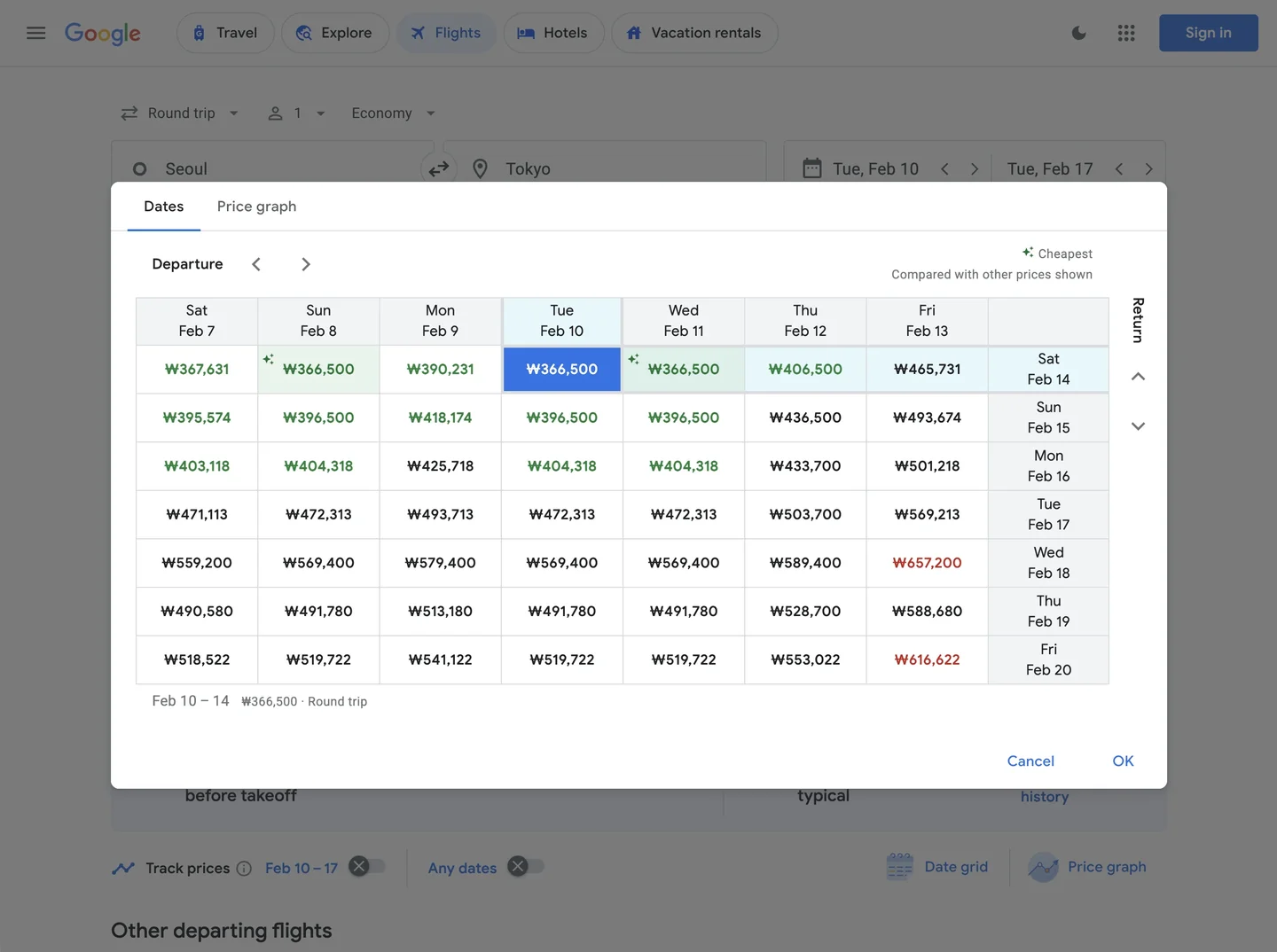 Quickly identifying cheapest date combinations with the Date Grid
Price Graph for Monthly Trends
Click the “Price Graph” tab in the date selection screen to see monthly price fluctuations for your route.
Why this feature is genuinely useful:
- Visually compare off-season and peak season prices
- Identify the cheapest weeks within a specific month
- Predict price spikes during holidays and festivals
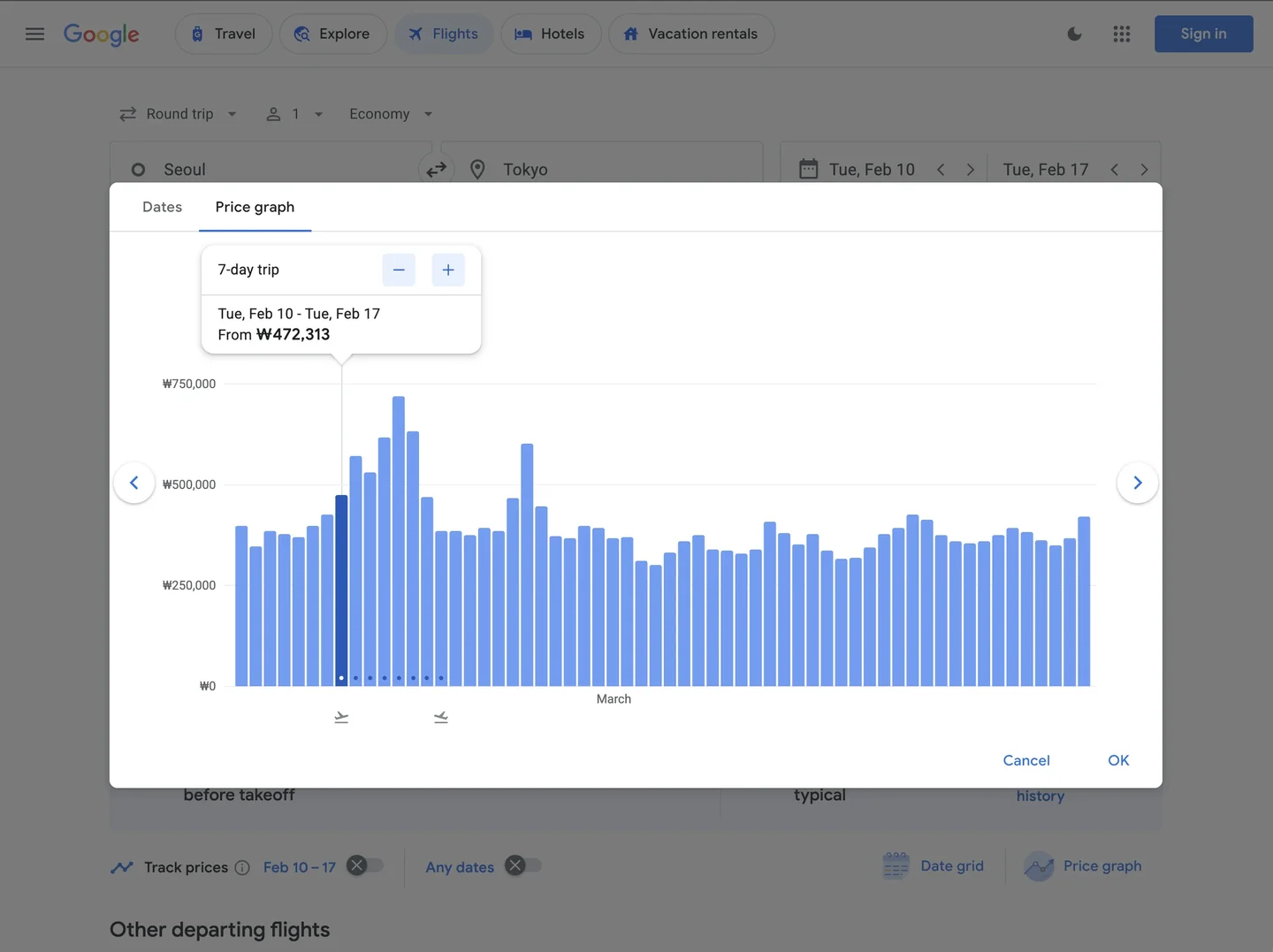 Visualizing monthly price trends with the Price Graph
⚠️ Pro Tip: International flights are often cheapest 6 weeks to 2 months before departure. This varies by route and season, though.
Explore Feature: Find Worldwide Deals
The best feature if you haven’t even decided on a destination yet.
Click the “Explore” button on the Google Flights main page, and you’ll see a map with lowest prices to destinations worldwide.
How to use it:
- Enter only your departure city (e.g., New York)
- Set approximate travel dates
- Browse cheapest destinations on the map
- Click on interesting cities for detailed searches
Once you’ve found the right window, you still need to keep an eye on prices — they keep moving in real time.
Monitoring: Automated Alerts via Price Tracking
Prices fluctuate in real-time. A $500 ticket today might be $450 tomorrow — or it could jump to $550.
With Google Flights’ Price Tracking feature:
- Search your desired route
- Turn ON the “Track prices” toggle
- Receive email alerts when prices change
How to Set Up Price Tracking
The core of this feature is email notifications. Google automatically emails you when the price of your desired flight drops.
- Search your desired route (e.g., Seoul → Okinawa)
- Enable the “Track prices” switch located at the bottom left of the search results
- You must be logged into your Google account. (Tracking is automatically saved to your account)
- Get an email alert whenever prices rise or fall.
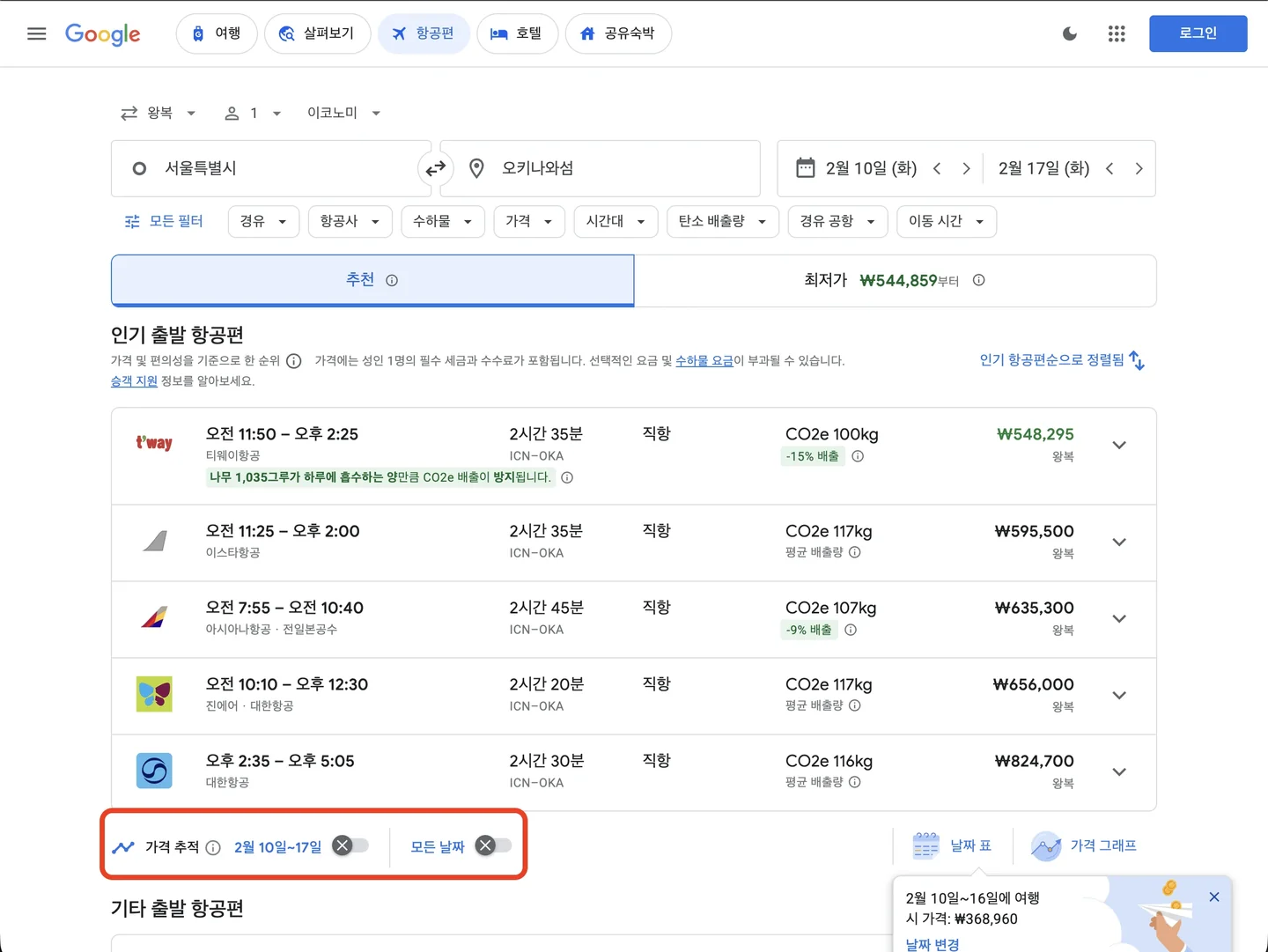 Enabling the Price Tracking feature to receive email alerts
📌 When Google decides “now is the lowest price”, it’ll flag that specifically. When you see that alert, book it.
Case Study: Finding Cheap Flights from NYC to Tokyo
Here’s how I actually used Google Flights when planning a recent Tokyo trip.
Conditions
- Origin: New York (JFK/EWR/LGA)
- Destination: Tokyo (NRT/HND)
- Trip Duration: 7 nights
- Schedule Flexibility: Anytime in March-April
Search Process
- Date Grid Check: Mid-March weekday departures were cheapest
- Price Graph Check: Third week of March was consistently affordable
- Final Result:
The weekday advantage is real!Found a round trip for $650 departing March 18 (Tue) → returning March 25 (Tue)
The same period with weekend departures (Sat-Sat) ran $850+. That’s a $200 difference.
Bottom Line: Four Features Worth Remembering
Google Flights goes beyond a simple search tool — it makes trip planning itself kind of fun.
If your schedule is flexible, here’s the playbook:
- Date Grid: Find the cheapest date combinations
- Price Graph: Understand seasonal pricing trends
- Explore Feature: Discover hidden destination gems
- Price Tracking: Book at the perfect moment
Master these four, and you can meaningfully cut your travel budget.
One caveat: don’t get too obsessed with the absolute lowest price. Booking a reasonable price within your target window is usually better for your sanity (and wallet). And if the price difference is small, book directly on the airline’s official website — cancellations and changes go much more smoothly than through an agency.
💰 The cheapest flights aren’t about “when you buy” but “how you search.”
Next trip, I’m starting with Google Flights again to find my own ‘reasonable price.’